
Thanks, I think that's it!
Qemu package and guide for OSX available
Moderators: Cat_7, Ronald P. Regensburg
-
darthnvader
- Apple Corer
- Posts: 231
- Joined: Sun Feb 07, 2016 4:40 pm
Re: Qemu package and guide for OSX available

Re: Qemu package and guide for OSX available
Got a few super dumb questions. What are the reasons that I can't run "-smp 4" with a Mac OS X 10.5.8 vm and only "-smp 2"? Also, why is the memory limit 2048mb and vgamem_mb seems to be 64MB? If I set the memory to anything higher, I get an error message that 2048mb is the limit and if I set vgamem_mb to anything more that 64MB, Mac OS X takes forever to attempt to boot (stuck at the apple logo screen and goes no further than that). I'm trying to get as much performance as I can with this VM  I'm using the "Qemu-system-ppc64-smp-universal-experimental-15-04-2025" build. Thanks!
I'm using the "Qemu-system-ppc64-smp-universal-experimental-15-04-2025" build. Thanks!
Re: Qemu package and guide for OSX available
Probably best to ask that question in the SMP thread; there's already a rich discussion there (and in other places) about the issues in getting the emulated hardware to emulate more than 2 processors; tests so far show that four are emulated, but the OS only recognizes two.celebi23 wrote: Sat May 31, 2025 6:43 pm Got a few super dumb questions. What are the reasons that I can't run "-smp 4" with a Mac OS X 10.5.8 vm and only "-smp 2"? Also, why is the memory limit 2048mb and vgamem_mb seems to be 64MB? If I set the memory to anything higher, I get an error message that 2048mb is the limit and if I set vgamem_mb to anything more that 64MB, Mac OS X takes forever to attempt to boot (stuck at the apple logo screen and goes no further than that). I'm trying to get as much performance as I can with this VM
When you're using an experimental build, you can expect lots of gaps in the emulation. The entire idea is to add features and test where they fail, and attempt to isolate what causes the failure.
Not sure that anyone's tried testing large VGAMem values yet though. And the 2048 error is because there are known addressing issues if the limit is set higher than that (likely the same with the vgamem, just that nobody had tested it yet).
Re: Qemu package and guide for OSX available
re all, trying to update installed macos 10.5 with -cdrom 10.5.7.dmg - starts w/o errors but no cd in desktop shown, what i do wrong?
p.s. earlier updated to 10.5.8 but freeze after boot start
p.s. earlier updated to 10.5.8 but freeze after boot start

Re: Qemu package and guide for OSX available
I created a new experimental qemu-system-ppc. Find it in the second post under experimental builds.
Some example command lines are:
./qemu-system-ppc \
-L pc-bios \
-M mac99,via=pmu \ (enables usb keyboard and mouse for all supported Mac OS and OS X, can be timer calibration sensitive)
-cpu g4 \
-smp 4 -accel tcg,thread=multi \ (enables symmetric multiprocessor. Use smp 2 for Mac OS 9 to Mac OS X 10.3, use smp 4 for Mac OSX 10.4 and 10.5)
-m 512 \
-display cocoa \
-boot c \
-drive file=10.4.qcow2 \
-device sungem,netdev=network01,mac=52:54:00:12:34:56,phy_type=1 \ (phy_type=1 enables the GMAC device)
-netdev vmnet-bridged,id=network01,ifname=en0 \
-serial stdio \
-device usb-audio (enables the usb-audio device)
For Server1.2v3:
./qemu-system-ppc \
-M g3beige \
-cpu g4 \ (must be set to g4)
-L pc-bios \
-m 256 \
-boot c \
-g 1024x768x8 \ (define window size, colour depth must be 8)
-display cocoa \
-drive file=Server1.2v3.img,format=raw,media=disk \
-serial stdio \
-usb -device usb-mouse \ (enables 1 usb device as supported with by this OS (per documentation). Attempts to minimize mouse jumpiness)
-nic user,model=bmac (enables the bmac network device, can be timer calibration sensitive: functionality is very dependent on host speed).
Some example command lines are:
./qemu-system-ppc \
-L pc-bios \
-M mac99,via=pmu \ (enables usb keyboard and mouse for all supported Mac OS and OS X, can be timer calibration sensitive)
-cpu g4 \
-smp 4 -accel tcg,thread=multi \ (enables symmetric multiprocessor. Use smp 2 for Mac OS 9 to Mac OS X 10.3, use smp 4 for Mac OSX 10.4 and 10.5)
-m 512 \
-display cocoa \
-boot c \
-drive file=10.4.qcow2 \
-device sungem,netdev=network01,mac=52:54:00:12:34:56,phy_type=1 \ (phy_type=1 enables the GMAC device)
-netdev vmnet-bridged,id=network01,ifname=en0 \
-serial stdio \
-device usb-audio (enables the usb-audio device)
For Server1.2v3:
./qemu-system-ppc \
-M g3beige \
-cpu g4 \ (must be set to g4)
-L pc-bios \
-m 256 \
-boot c \
-g 1024x768x8 \ (define window size, colour depth must be 8)
-display cocoa \
-drive file=Server1.2v3.img,format=raw,media=disk \
-serial stdio \
-usb -device usb-mouse \ (enables 1 usb device as supported with by this OS (per documentation). Attempts to minimize mouse jumpiness)
-nic user,model=bmac (enables the bmac network device, can be timer calibration sensitive: functionality is very dependent on host speed).
Re: Qemu package and guide for OSX available
Do i have to do something extra to get audio with this new release ? and my apple Magic Mouse 2 is very slow in os9.2.2
also I had to use virtio tablet en disable sunbeam and vmnet because got error in terminal (perhaps not enough permissions for the network to be created.
appreciate any help specially for mouse movement
here is my command line :
#!/bin/bash
cd "$(dirname "$0")"
./qemu-system-ppc \
-L pc-bios \
-M mac99,via=pmu \
-cpu g4 \
-smp 2 -accel tcg,thread=multi \
-m 768 \
-display cocoa \
-boot c \
-drive file=MacOS92DTP.img,format=raw,media=disk \
#-device sungem,netdev=network01,mac=52:54:00:12:34:56,phy_type=1 \
#-netdev vmnet-bridged,id=network01,ifname=en0 \
-serial stdio \
-device usb-audio
-device loader,addr=0x4000000,file=./ndrvloader \
-prom-env "boot-command=init-program go" \
-device virtio-tablet-pci \
#-device virtio-9p-pci,fsdev=UNIQUENAME,mount_tag="Macintosh HD" \
#-fsdev local,id=UNIQUENAME,security_model=none,path=/SOME/FOLDER/YOU/WANT/TO/SHARE
also I had to use virtio tablet en disable sunbeam and vmnet because got error in terminal (perhaps not enough permissions for the network to be created.
appreciate any help specially for mouse movement
here is my command line :
#!/bin/bash
cd "$(dirname "$0")"
./qemu-system-ppc \
-L pc-bios \
-M mac99,via=pmu \
-cpu g4 \
-smp 2 -accel tcg,thread=multi \
-m 768 \
-display cocoa \
-boot c \
-drive file=MacOS92DTP.img,format=raw,media=disk \
#-device sungem,netdev=network01,mac=52:54:00:12:34:56,phy_type=1 \
#-netdev vmnet-bridged,id=network01,ifname=en0 \
-serial stdio \
-device usb-audio
-device loader,addr=0x4000000,file=./ndrvloader \
-prom-env "boot-command=init-program go" \
-device virtio-tablet-pci \
#-device virtio-9p-pci,fsdev=UNIQUENAME,mount_tag="Macintosh HD" \
#-fsdev local,id=UNIQUENAME,security_model=none,path=/SOME/FOLDER/YOU/WANT/TO/SHARE
Re: Qemu package and guide for OSX available
this build does not have cumulative functionality on top of the one you are now using.
#!/bin/bash
cd "$(dirname "$0")"
./qemu-system-ppc \ --> sudo needed to run vmnet. If you don't need that, leave out the two network-related lines
-L pc-bios \
-M mac99,via=pmu \
-cpu g4 \
-smp 2 -accel tcg,thread=multi \
-m 768 \
-display cocoa \
-boot c \
-drive file=MacOS92DTP.img,format=raw,media=disk \
-device sungem,netdev=network01,mac=52:54:00:12:34:56,phy_type=1 \
-netdev vmnet-bridged,id=network01,ifname=en0 \ --> this requires checking whether your default network device is indeed named en0
-serial stdio \
-device usb-audio
Best,
Cat_7
#!/bin/bash
cd "$(dirname "$0")"
./qemu-system-ppc \ --> sudo needed to run vmnet. If you don't need that, leave out the two network-related lines
-L pc-bios \
-M mac99,via=pmu \
-cpu g4 \
-smp 2 -accel tcg,thread=multi \
-m 768 \
-display cocoa \
-boot c \
-drive file=MacOS92DTP.img,format=raw,media=disk \
-device sungem,netdev=network01,mac=52:54:00:12:34:56,phy_type=1 \
-netdev vmnet-bridged,id=network01,ifname=en0 \ --> this requires checking whether your default network device is indeed named en0
-serial stdio \
-device usb-audio
Best,
Cat_7
Re: Qemu package and guide for OSX available
I get this with your corrected command line
-netdev vmnet-bridged,id=network01,ifname=en0: cannot create vmnet interface: general failure (possibly not enough privileges)
-netdev vmnet-bridged,id=network01,ifname=en0: cannot create vmnet interface: general failure (possibly not enough privileges)
Re: Qemu package and guide for OSX available
use:
sudo ./qemu-system-ppc \
and enter your password when asked
Best,
Cat_7
sudo ./qemu-system-ppc \
and enter your password when asked
Best,
Cat_7
Re: Qemu package and guide for OSX available
Yes, it works with 4 cpus in Leopard! (qemu compiled on Linux with patches, openbios from experimental Qemu zip from 08 feb 2026)
sorry fort BIG PICTURE, can't find spoiler tag o.o
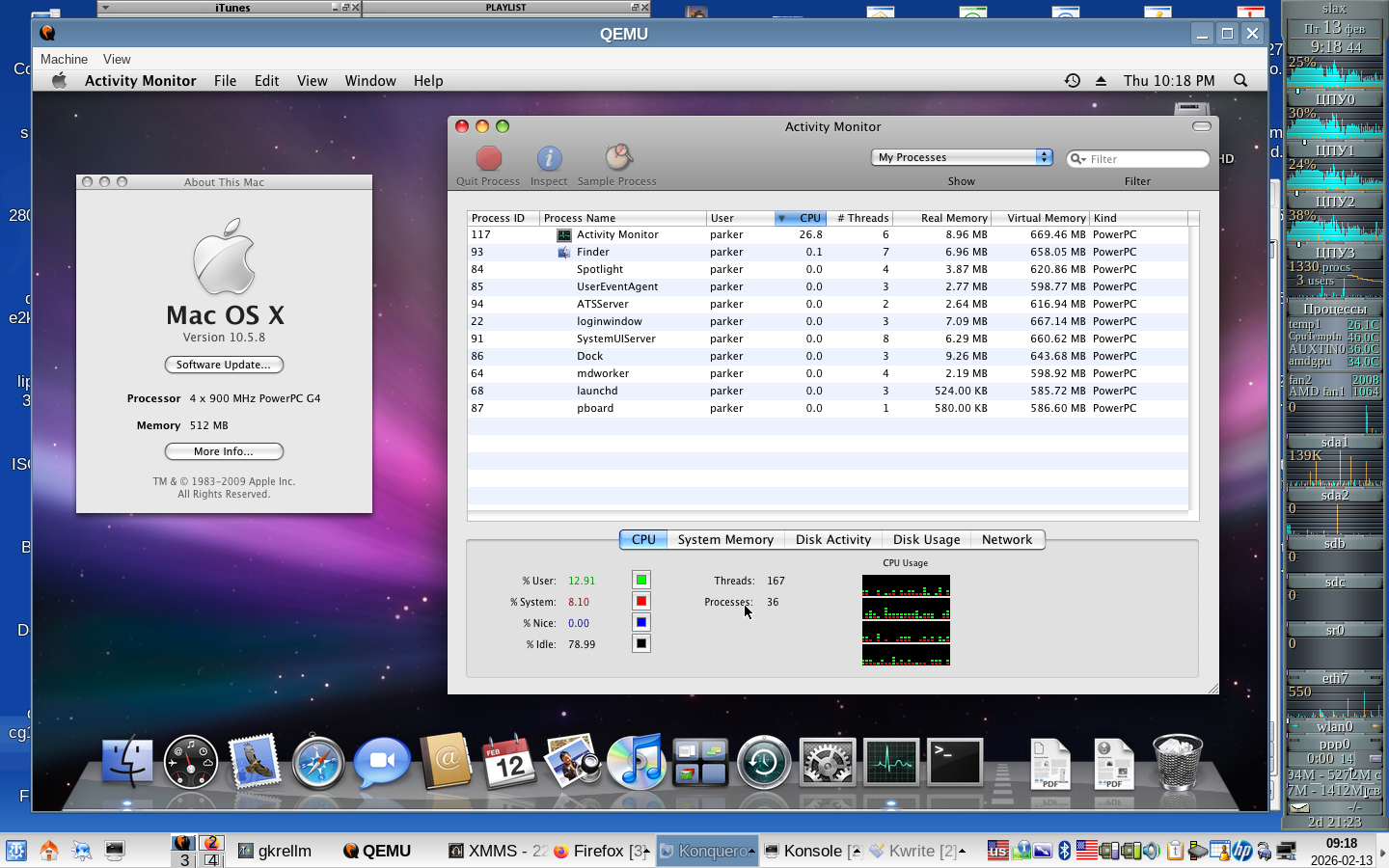
sorry fort BIG PICTURE, can't find spoiler tag o.o
Re: Qemu package and guide for OSX available
Yes, lovely, isn´t it? have you also tried the usb-audio fix?
Best,
Cat_7
Best,
Cat_7
Re: Qemu package and guide for OSX available
I don't have any audio macOS9 latest feb. qemu with this command line :
#!/bin/bash
cd "$(dirname "$0")"
./qemu-system-ppc \ --> sudo needed to run vmnet. If you don't need that, leave out the two network-related lines
-L pc-bios \
-M mac99,via=pmu \
-cpu g4 \
-smp 2 -accel tcg,thread=multi \
-m 768 \
-display cocoa \
-boot c \
-drive file=MacOS92DTP.img,format=raw,media=disk \
-device sungem,netdev=network01,mac=52:54:00:12:34:56,phy_type=1 \
-netdev vmnet-bridged,id=network01,ifname=en0 \ --> this requires checking whether your default network device is indeed named en0
-serial stdio \
-device usb-audio
does I have to do anything else except running the command line with sudo, to have audio working ? with sudo it boots macOS 9 with my command line but no sound in iTunes.
thx for any help
#!/bin/bash
cd "$(dirname "$0")"
./qemu-system-ppc \ --> sudo needed to run vmnet. If you don't need that, leave out the two network-related lines
-L pc-bios \
-M mac99,via=pmu \
-cpu g4 \
-smp 2 -accel tcg,thread=multi \
-m 768 \
-display cocoa \
-boot c \
-drive file=MacOS92DTP.img,format=raw,media=disk \
-device sungem,netdev=network01,mac=52:54:00:12:34:56,phy_type=1 \
-netdev vmnet-bridged,id=network01,ifname=en0 \ --> this requires checking whether your default network device is indeed named en0
-serial stdio \
-device usb-audio
does I have to do anything else except running the command line with sudo, to have audio working ? with sudo it boots macOS 9 with my command line but no sound in iTunes.
thx for any help
Re: Qemu package and guide for OSX available
Audio does not need sudo. Only the vmnet network.
What did you try run in iTunes? Due to changes in access to the radio station list the radio will not work, but it should play an mp3.
Have you tried the system sounds in the sound control panel?
Can you give me your exact command line?
This command line should work without sudo, giving you the default network access:
#!/bin/bash
cd "$(dirname "$0")"
./qemu-system-ppc \
-L pc-bios \
-M mac99,via=pmu \
-cpu g4 \
-smp 2 -accel tcg,thread=multi \
-m 768 \
-display cocoa \
-boot c \
-drive file=MacOS92DTP.img,format=raw,media=disk \
-serial stdio \
-device usb-audio
What did you try run in iTunes? Due to changes in access to the radio station list the radio will not work, but it should play an mp3.
Have you tried the system sounds in the sound control panel?
Can you give me your exact command line?
This command line should work without sudo, giving you the default network access:
#!/bin/bash
cd "$(dirname "$0")"
./qemu-system-ppc \
-L pc-bios \
-M mac99,via=pmu \
-cpu g4 \
-smp 2 -accel tcg,thread=multi \
-m 768 \
-display cocoa \
-boot c \
-drive file=MacOS92DTP.img,format=raw,media=disk \
-serial stdio \
-device usb-audio
Re: Qemu package and guide for OSX available
ohhh thx Cat7, it are all radiostations url's that I use in iTunes macos9 so I'll think better go back older screamer version as then they played very well, pitty though that I can't use smp2.
Re: Qemu package and guide for OSX available
I don't understand. The iTunes radio stations will also not work with the screamer as the problem is on internet side of things.
Unless you are using a patched iTunes version in Mac OS 9?
Did you try to play some system sounds to check whether you have any sound at all with the usb-audio option?
Best,
Cat_7
Unless you are using a patched iTunes version in Mac OS 9?
Did you try to play some system sounds to check whether you have any sound at all with the usb-audio option?
Best,
Cat_7
Re: Qemu package and guide for OSX available
Cat_7 wrote: Fri Feb 13, 2026 8:12 am Yes, lovely, isn´t it? have you also tried the usb-audio fix?
Best,
Cat_7
No, not yet. I hope to restore some tracing lines from smp patch first. (I applied pieces with plain patch, so they just hang there uncommited)
Re: Qemu package and guide for OSX available
must be a patched iTunes I think because long time ago that I configured this emulated environment with all the software :
https://www.transferxl.com/download/08jLJfhDpH3WXZ
https://www.transferxl.com/download/08jLJfhDpH3WXZ
-
Programmingkid
- Apple Corer
- Posts: 245
- Joined: Sun Jan 31, 2016 6:01 pm
Re: Qemu package and guide for OSX available
When I tried the 08-02-2026 experimental build I had to push the "open anyways" button in Security & Privacy for each library. After that I saw this error:
dyld[4008]: Symbol not found: _endwin$NCURSES60
Referenced from: /Users/user/Desktop/Qemu-system-ppc-macOS-Experimental-08-02-2026/qemu-system-ppc
Expected in: /usr/lib/libncurses.5.4.dylib
Abort trap: 6
I think including information on what the system requirements are for each build would be helpful. Listing the Mac OS version used to build the binary would probably be enough.
By info:
Mac OS 12.3.1
Apple M1
dyld[4008]: Symbol not found: _endwin$NCURSES60
Referenced from: /Users/user/Desktop/Qemu-system-ppc-macOS-Experimental-08-02-2026/qemu-system-ppc
Expected in: /usr/lib/libncurses.5.4.dylib
Abort trap: 6
I think including information on what the system requirements are for each build would be helpful. Listing the Mac OS version used to build the binary would probably be enough.
By info:
Mac OS 12.3.1
Apple M1
Last edited by Programmingkid on Sat Feb 14, 2026 8:27 pm, edited 1 time in total.
Re: Qemu package and guide for OSX available
That is too bad. The executable was built on an M1 running Tahoe.
The fixed usb-audio files are provided so you might be able to build your own. However, there is now also a patch on the developers list that fixes usb-audio for Mac OS 9, but not for Mac OS X.
Best,
Cat_7
The fixed usb-audio files are provided so you might be able to build your own. However, there is now also a patch on the developers list that fixes usb-audio for Mac OS 9, but not for Mac OS X.
Best,
Cat_7
-
Programmingkid
- Apple Corer
- Posts: 245
- Joined: Sun Jan 31, 2016 6:01 pm
Re: Qemu package and guide for OSX available
Thank you for the information. Do you think you could post the complete source code used to build the 08-02-2026 experimental build? It would make it a lot easier for others to build. I know the download does include the changed files, but there is no mention of which version of QEMU to use them with.
Re: Qemu package and guide for OSX available
Yet another experimental build has arrived. See the second post in this thread.
It includes improved support for a shared folder in Mac OS 9.x only, and the usb-audio fixes for Mac OS 9.x and OS X from the previous experimental build.
Take care not to use a space in the mount_tag= argument
Example command line:
#!/bin/bash
cd "$(dirname "$0")"
./qemu-system-ppc \
-L pc-bios \
-M mac99,via=pmu \
-display cocoa \
-m 512 \
-boot c \
-drive file=9.2.img,format=raw,media=disk \
-device loader,addr=0x4000000,file=./ndrvloader \
-prom-env "boot-command=init-program go" \
-device virtio-9p-pci,fsdev=UNIQUENAME,mount_tag="SharedFolder" \
-fsdev local,id=UNIQUENAME,macos_compat=on,security_model=none,path=/path/to/some/folder \
-device usb-audio
Best,
Cat_7
It includes improved support for a shared folder in Mac OS 9.x only, and the usb-audio fixes for Mac OS 9.x and OS X from the previous experimental build.
Take care not to use a space in the mount_tag= argument
Example command line:
#!/bin/bash
cd "$(dirname "$0")"
./qemu-system-ppc \
-L pc-bios \
-M mac99,via=pmu \
-display cocoa \
-m 512 \
-boot c \
-drive file=9.2.img,format=raw,media=disk \
-device loader,addr=0x4000000,file=./ndrvloader \
-prom-env "boot-command=init-program go" \
-device virtio-9p-pci,fsdev=UNIQUENAME,mount_tag="SharedFolder" \
-fsdev local,id=UNIQUENAME,macos_compat=on,security_model=none,path=/path/to/some/folder \
-device usb-audio
Best,
Cat_7
Re: Qemu package and guide for OSX available
Cat 7
Does this 18/02 release also support G4 multi cpu smp2 for macOS 9, and please can someone give me the best command settings for smoothening/better/best Magic Mouse 2 support from an iMac m4 ?
PS: without smp2 command yet, the usb-audio works great even for be radio-stations via iTunes.
Does this 18/02 release also support G4 multi cpu smp2 for macOS 9, and please can someone give me the best command settings for smoothening/better/best Magic Mouse 2 support from an iMac m4 ?
PS: without smp2 command yet, the usb-audio works great even for be radio-stations via iTunes.
Re: Qemu package and guide for OSX available
Hi,
No, this last experimental build only has the audio fix and the (hopefully) shared folder improvements.

Best,
Cat_7
No, this last experimental build only has the audio fix and the (hopefully) shared folder improvements.
That's great to hearthe usb-audio works great even for be radio-stations via iTunes.
Best,
Cat_7
Re: Qemu package and guide for OSX available
Here still crashes when used shared folder, tried within O9 to shared folder -> crashed system, force quite looked in map the file I copied from os 9 was there, the other way round put a file from my tahoe to the shared folder, started qemu O9 when going to shared folders file there but again completely crashed qemu system
pitty
pitty