
SheepShaver for Windows
Moderators: Cat_7, Ronald P. Regensburg, ClockWise
-
Ronald P. Regensburg

- Expert User
- Posts: 8202
- Joined: Thu Feb 09, 2006 10:24 pm
- Location: Amsterdam, Netherlands
Re: SheepShaver for Windows
With recent SheepShaver builds, hitting control-return should toggle full screen display in the original ratio with black bars at the sides. That is how it works in the macOS version. Doesn't it work that way in the Windows version?
-
Cap'n Tycho
- Space Cadet
- Posts: 5
- Joined: Wed Mar 08, 2023 4:17 am
Re: SheepShaver for Windows
Control+enter does toggle in fullscreen, but the current version doesn't seem to keep it in aspect-ratio, no. the much older versions of sheepshaver that I used previously for windows definitely do, though
-
Ronald P. Regensburg
- Expert User
- Posts: 8202
- Joined: Thu Feb 09, 2006 10:24 pm
- Location: Amsterdam, Netherlands
Re: SheepShaver for Windows
I reported the issue to the developer kanjitalk755.

Re: SheepShaver for Windows
With this in the prefs file I can switch between windowed and full screen using Ctrl-Enter.
It keeps the correct aspect ratio. So I can't reproduce.
screen win/800/600
windowmodes 3
screenmodes 63
sdlrender software
sdl_vsync false
Best,
Cat_7
It keeps the correct aspect ratio. So I can't reproduce.
screen win/800/600
windowmodes 3
screenmodes 63
sdlrender software
sdl_vsync false
Best,
Cat_7
-
Ronald P. Regensburg
- Expert User
- Posts: 8202
- Joined: Thu Feb 09, 2006 10:24 pm
- Location: Amsterdam, Netherlands
Re: SheepShaver for Windows
Also kanjitalk755 could not reproduce this issue.
-
Cap'n Tycho
- Space Cadet
- Posts: 5
- Joined: Wed Mar 08, 2023 4:17 am
Re: SheepShaver for Windows
oh dear! maybe it's a display driver issue on my end then. I'll see what I can do and I'll report back if I have any luck
-
Cap'n Tycho
- Space Cadet
- Posts: 5
- Joined: Wed Mar 08, 2023 4:17 am
Re: SheepShaver for Windows
a brief update: strangely, changing sheepshaver's resolution to 640x480 resolves this issue, but any other resolution appears stretched. sadly this isn't a solution for me since the program I am trying to run requires 800x600 to run, but maybe it can help shed some light on the issue. since the issue wasn't reproducible for you folks, pls let me know if there's any info I can provide that would help
-
Ronald P. Regensburg
- Expert User
- Posts: 8202
- Joined: Thu Feb 09, 2006 10:24 pm
- Location: Amsterdam, Netherlands
Re: SheepShaver for Windows
To be able to compare settings Cat_7 used (without the stretching issue) and your settings, please post here the content of your SheepShaver prefs file.
You will l find the file named SheepShaver_prefs in your SheepShaver folder. Open it with Notepad, select the content, and copy/paste that in your reply.
(A new security feature on the server may prevent posting the content of the prefs file and will then present a server error. If that happens, we will try and find a different way.)
You will l find the file named SheepShaver_prefs in your SheepShaver folder. Open it with Notepad, select the content, and copy/paste that in your reply.
(A new security feature on the server may prevent posting the content of the prefs file and will then present a server error. If that happens, we will try and find a different way.)
Re: SheepShaver for Windows
I've uploaded a new SheepShaver build. The build should be considered experimental.
It supports drag and drop of disk images onto the SheepShaver window to mount images of CDs, HDs, and floppies. They show up as read-only CDs. See the first post in this thread.
Note that this does not improve on the types of images SheepShaver can read.
Best,
Cat_7
It supports drag and drop of disk images onto the SheepShaver window to mount images of CDs, HDs, and floppies. They show up as read-only CDs. See the first post in this thread.
Note that this does not improve on the types of images SheepShaver can read.
Best,
Cat_7
Re: SheepShaver for Windows
I live in Japan.
When we mount a Windows drive with SheepShaver and access a Windows file, the time stamp of the file advances by about 14 hours.
When we mount a Windows drive with SheepShaver and access a Windows file, the time stamp of the file advances by about 14 hours.
Last edited by S6Bow on Fri Aug 11, 2023 4:22 pm, edited 2 times in total.

Re: SheepShaver for Windows
Interesting; is this an issue just with image drag and drop, or with regular image mounting as well? Or are you talking specifically about mounting a physical partition inside SheepShaver?S6Bow wrote: Fri Aug 11, 2023 4:11 pm I live in Japan.
When we mount a Windows drive with SheepShaver and access a Windows file, the time stamp of the file advances by about 14 hours.
Re: SheepShaver for Windows
This is a problem with the normal Windows drive mounting functionality.
When we mount a Windows drive with SheepShaver and access a Windows file, the time stamp of the file advances by about 14 hours.
In addition, the region of MacOS time on SheepShaver is Tokyo, Japan.
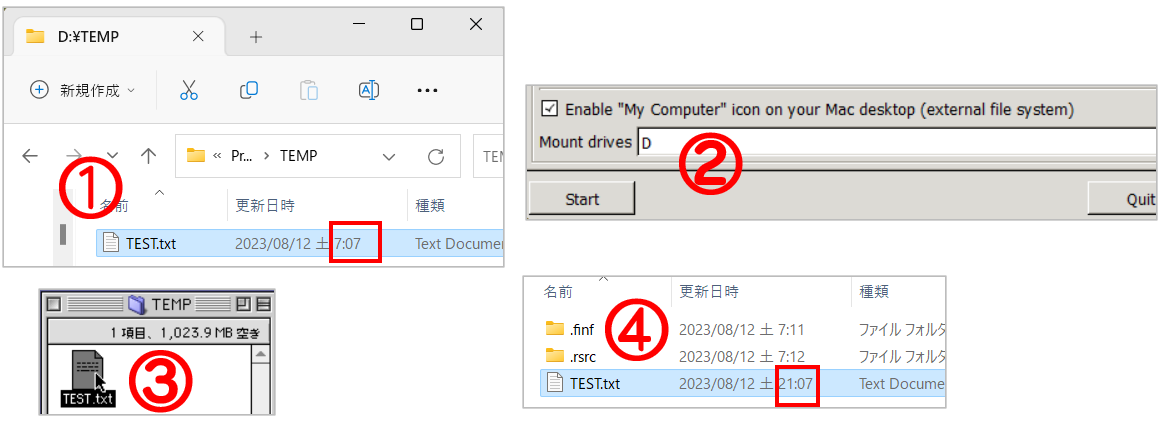
When we mount a Windows drive with SheepShaver and access a Windows file, the time stamp of the file advances by about 14 hours.
In addition, the region of MacOS time on SheepShaver is Tokyo, Japan.
Last edited by S6Bow on Fri Aug 11, 2023 10:37 pm, edited 1 time in total.
Re: SheepShaver for Windows
This is just an observation, not a criticism.
I have noticed, that compared to SheepShaver for MacOS, the Windows version displays quite a lot of graphical glitches when used in full screen mode. This includes slow downs and choppy graphics (particularly with anything using QuickTime), and large patches of black appearing on the screen, particularly when starting or closing applications. Moving the mouse over those areas sometimes removes the black patches, but not always. Not all apps are affected - but big offenders seem to be apps that require thousands/millions of colors, or bit-depth switches when starting, and games from certain studios, such as LucasArts. For example - Dark Forces on Mac - slow, put playable .. on Windows, stutters and lags to the point of being completely unplayable - with the exact same preference settings, ROM, system etc.
This is regardless of whether software or hardware accelerated graphics are used, including opengl vs direct3d. I am testing SheepShaver in both MacOS and Windows on the same machine, using Bootcamp, so I can rule out the vagaries of different graphics cards and other hardware configurations etc.. I have also used the exact same settings for various hosts and games on both systems, in fact I am using the same installation folders, drive images and preference settings. My machine is Intel based, so this is not related to the recent switch to ARM on Macs.
I guess I would like to know, has anyone else experienced these issues, and are there any potential workarounds, i.e. compiling with different versions of SDL in Windows? Or is the Windows version just inherently less compatible and speedy when compared to the MacOS build? It seems strange, given both would rely on the same SDL based underpinings?
I have noticed, that compared to SheepShaver for MacOS, the Windows version displays quite a lot of graphical glitches when used in full screen mode. This includes slow downs and choppy graphics (particularly with anything using QuickTime), and large patches of black appearing on the screen, particularly when starting or closing applications. Moving the mouse over those areas sometimes removes the black patches, but not always. Not all apps are affected - but big offenders seem to be apps that require thousands/millions of colors, or bit-depth switches when starting, and games from certain studios, such as LucasArts. For example - Dark Forces on Mac - slow, put playable .. on Windows, stutters and lags to the point of being completely unplayable - with the exact same preference settings, ROM, system etc.
This is regardless of whether software or hardware accelerated graphics are used, including opengl vs direct3d. I am testing SheepShaver in both MacOS and Windows on the same machine, using Bootcamp, so I can rule out the vagaries of different graphics cards and other hardware configurations etc.. I have also used the exact same settings for various hosts and games on both systems, in fact I am using the same installation folders, drive images and preference settings. My machine is Intel based, so this is not related to the recent switch to ARM on Macs.
I guess I would like to know, has anyone else experienced these issues, and are there any potential workarounds, i.e. compiling with different versions of SDL in Windows? Or is the Windows version just inherently less compatible and speedy when compared to the MacOS build? It seems strange, given both would rely on the same SDL based underpinings?
Re: SheepShaver for Windows
I tried compiling my own SheepShaver build, but so far that has not made a difference. I am not yet advanced enough with Windows to know how to compile with different SDL versions.
Separate to my above comment, I am also having problems getting SheepShaver to launch immediately into fullscreen mode, while honoring the nearest/integer scaling settings. Basically, it does not do it, when using:
win/640/480
windowmodes 3
screenmodes 63
It launches normally but the image is not properly scaled, cuts off a large portion of the desktop, and is blurry. If I press control-enter twice, once to switch back to windowed mode and then again to go back into fullscreen, everything scales fine and looks normal.
I developed a work-around. SheepShaver for Windows seems to be very sensitive to how quickly you press control-enter to switch. If it happens immediately on application launch (i.e. from the preferences file), it always fails to recognize the "scale_nearest true" and "scale_integer true" settings.
However, I used an Autohotkey launch script to switch after a delay:
This delays the fullscreen switch for a specified number of seconds. This causes SheepShaver to honor the integer/nearest scaling in the preferences and everything looks good.
..unless I then launch an application that wants to switch bit depth or resolution again from within the MacOS .. then it acts like it does previously.
Not sure why this happens in the Windows build, but hopefully it will eventually be resolved. Using the script is less annoying than having to press control-enter twice every time.
Separate to my above comment, I am also having problems getting SheepShaver to launch immediately into fullscreen mode, while honoring the nearest/integer scaling settings. Basically, it does not do it, when using:
win/640/480
windowmodes 3
screenmodes 63
It launches normally but the image is not properly scaled, cuts off a large portion of the desktop, and is blurry. If I press control-enter twice, once to switch back to windowed mode and then again to go back into fullscreen, everything scales fine and looks normal.
I developed a work-around. SheepShaver for Windows seems to be very sensitive to how quickly you press control-enter to switch. If it happens immediately on application launch (i.e. from the preferences file), it always fails to recognize the "scale_nearest true" and "scale_integer true" settings.
However, I used an Autohotkey launch script to switch after a delay:
Code: Select all
Run C:\Users\Adam\Desktop\SheepShaver\SheepShaver.exe --config "C:\Users\Adam\Desktop\SheepShaver\SheepShaver_prefs"

Sleep, 2000

Send !^{Enter}..unless I then launch an application that wants to switch bit depth or resolution again from within the MacOS .. then it acts like it does previously.
Not sure why this happens in the Windows build, but hopefully it will eventually be resolved. Using the script is less annoying than having to press control-enter twice every time.
-
kanjitalk755
- Apple Corer
- Posts: 242
- Joined: Thu Nov 09, 2017 12:06 pm
Re: SheepShaver for Windows
On any host, whether windowed or fullscreen, the drawing method is the same, and we let SDL handle the differences.almeath wrote: Tue Aug 15, 2023 1:24 pm It seems strange, given both would rely on the same SDL based underpinings?
However, when I tried Dark Forces, I confirmed that it doesn't draw properly in fullscreen mode on Windows.
Same with SDL2 2.0.14 (oldest version SheepShaver can work with).
No workaround is currently known.
Try the branch below.almeath wrote: Wed Aug 16, 2023 7:03 am Separate to my above comment, I am also having problems getting SheepShaver to launch immediately into fullscreen mode, while honoring the nearest/integer scaling settings.
https://github.com/kanjitalk755/macemu/ ... fullscreen
Re: SheepShaver for Windows
I just compiled that branch and it seems to work perfectly. I can launch directly into full screen mode with no delay and no graphical glitches.kanjitalk755 wrote: Mon Aug 21, 2023 1:25 am
Try the branch below.
https://github.com/kanjitalk755/macemu/ ... fullscreen
Is this a change that can be rolled into the master branch or does it require further testing?
Re: SheepShaver for Windows
I also tested this, and at one time switching from full screen to windowed mode resulted in a window stuck in the left upper corner of my screen with no way to grab the title bar. I had to change resolution in Mac OS to get the window to display in the middle of my screen.
Best,
Cat_7
Best,
Cat_7
Re: SheepShaver for Windows
I also have the window stuck in the upper left corner of the screen when switching back to windowed mode during a session. However, I have no specific need to do so. Perhaps it is a niche requirement to want to both launch and run in full screen mode only. I personally do not find myself having to switch back and forth between the two, as I would just set a launch preference of "dga" or "win" in each individual configuration, and specifically launch the configuration I need at any given time. If the fullscreen branch continues to be made available on @kanjitalk755's Github repository, then I am happy enough to manually compile going forward.
-
kanjitalk755
- Apple Corer
- Posts: 242
- Joined: Thu Nov 09, 2017 12:06 pm
Re: SheepShaver for Windows
Added setting window position when switching to windowed mode.
Please test again with the latest test_fullscreen branch.
Please test again with the latest test_fullscreen branch.
Re: SheepShaver for Windows
The window still jumps to the upper left corner of the screen after exiting full screen, but at least now we have a menu bar to move it 
The currently behaviour is that when the screen is in the upper left corner after exiting full screen, a resolution switch in Mac OS moves it to the centre of the screen.
Could exit from full screen move it to the centre directly?
Best,
Cat_7
The currently behaviour is that when the screen is in the upper left corner after exiting full screen, a resolution switch in Mac OS moves it to the centre of the screen.
Could exit from full screen move it to the centre directly?
Best,
Cat_7
-
kanjitalk755
- Apple Corer
- Posts: 242
- Joined: Thu Nov 09, 2017 12:06 pm
Re: SheepShaver for Windows
Ah, I see.
Fixed.
Fixed.
Re: SheepShaver for Windows
indeed, fixed!
This seem to work as could be expected, thanks!
Best,
Cat_7
This seem to work as could be expected, thanks!
Best,
Cat_7
Re: SheepShaver for Windows
Confirmed it is working for me too - switching to windowed mode has the window show up in the middle of the screen with the menu bar available. Looks like we have best of both worlds now, thanks for the fix. 
-
kanjitalk755
- Apple Corer
- Posts: 242
- Joined: Thu Nov 09, 2017 12:06 pm
Re: SheepShaver for Windows
Merged to the master.
-
kanjitalk755
- Apple Corer
- Posts: 242
- Joined: Thu Nov 09, 2017 12:06 pm
Re: SheepShaver for Windows
Fixed the issue that garbage remains when running "Dark Forces" in Windows fullscreen.
It only effects when VOSF is disabled (default).
It also fixes the following bug:
viewtopic.php?t=11980
However, since I changed framebuffer handling, new bugs may appear.
https://github.com/kanjitalk755/macemu/ ... ramebuffer
It only effects when VOSF is disabled (default).
It also fixes the following bug:
viewtopic.php?t=11980
However, since I changed framebuffer handling, new bugs may appear.
https://github.com/kanjitalk755/macemu/ ... ramebuffer