

You can always run Leopard in Qemu.
However, would it not be a good idea to provide an empty disk for download?
Best,
Cat_7
MAME Power Macintosh 6100 boots!
Moderators: Cat_7, Ronald P. Regensburg
Re: MAME Power Macintosh 6100 boots!
Hmm, the lengths I will go to to test stuff .. installing Leopard in order to create a DMG that will hopefully load in DingusPPC so that I can then install 7.1.2 onto it and perhaps make it boot in MAME, even though it's very much a work in progress.. sounds like fun! 
I happen to have a functioning 2007 aluminum iMac that originally came with Tiger. I lost the install DVD, and it was upgraded to El Capitan.. but I should be able to download a Leopard or Tiger ISO and then use Disk Utility or the terminal in El Capitan to make a bootable installer, partition the internal drive and then get either of those operating systems running on it again, in order to create the DMG.
This will be an interesting side project in itself.
I happen to have a functioning 2007 aluminum iMac that originally came with Tiger. I lost the install DVD, and it was upgraded to El Capitan.. but I should be able to download a Leopard or Tiger ISO and then use Disk Utility or the terminal in El Capitan to make a bootable installer, partition the internal drive and then get either of those operating systems running on it again, in order to create the DMG.
This will be an interesting side project in itself.

Re: MAME Power Macintosh 6100 boots!
Try this: https://github.com/adespoton/utmconfigs ... y).utm.zipalmeath wrote: Fri Jan 10, 2025 8:11 am EDIT - so HFS is deprecated in newer versions of MacOS X. Does anyone have a DMG formatted in HFS (hence readable by DingusPPC) that they would be willing to share? It would not matter what version of MacOS is on it, as long as I can get it to show up on the desktop in Dingus when booting off the 7.1.2 CD - then I can hopefully format and do a fresh install of the OS.
You'll want the disk image inside the bundle; I've pre-formatted it as a 1GB HFS image with proper partitioning; it works with qemu-system-68k Q800 profile.
However... it's in qcow2 format, so you'll need to convert it to raw using the qemu-img command line tool before you can use it in DingusPPC or MAME.
You could also run it through chdman before using it in MAME if you wanted to -- and MAME also supports a fake NuBus device that can handle a SheepShaver-formatted single HFS partition image, wrapping it with all the stuff needed to boot a real system.
Seems odd to me though that Disk Jockey-formatted images wouldn't work. It must be installing the 68k SCSI driver instead of the PPC one?
Re: MAME Power Macintosh 6100 boots!
Perhaps. I tried both the Windows and macOS versions of Disk Jockey, with the same result: DingusPPC recognizes the image in the terminal, but upon boot, the message "This disk is damaged: Do you want to initialize it?" appears. Clicking initialize will result in the freeze up I previously mentioned. The disk was created with the 'BlueSCSI' pre-set.adespoton wrote: Fri Jan 10, 2025 7:47 pm Seems odd to me though that Disk Jockey-formatted images wouldn't work. It must be installing the 68k SCSI driver instead of the PPC one?
Re: MAME Power Macintosh 6100 boots!
This is an empty 1GB hard disk image (raw format - no compression or headers - works with DingusPPC and SheepShaver) with Mac OS 9 drivers and HFS formatted partition.
https://www.dropbox.com/scl/fi/3xmdbxyu ... yvkzr&dl=0
created using the method I described previously using Intel Mac OS X Leopard 10.5.8.
https://www.dropbox.com/scl/fi/3xmdbxyu ... yvkzr&dl=0
created using the method I described previously using Intel Mac OS X Leopard 10.5.8.
Re: MAME Power Macintosh 6100 boots!
Thanks for the disk images, that has sped up the testing process.
This is what I can confirm so far:
1. The blank DMG above works fine in DingusPPC with System 7.5.5 installed onto it. So I know the image is OK.
2. The System 7.1.2 ISO (691-0187-A,Power Macintosh 6100-60-60AV, 7100-66-66AV, and 8100-80-80AV. SSW v7.1.2 (CD) SHA-1: 66D8ECDF5EB9B42F2467E03614541E43986C78D1) boots successfully in Dingus PPC if no HDD is specified in the launch parameters.
3. If I then add the blank DMG to the launch parameters, the CD image boots up to the point of the QuickTime extension loading, and then I just get a blank grey screen with apparent freeze up (which prevents me from installing System 7.1.2 onto the DMG using DingusPPC).
4. Instead, I installed 7.1.2 onto the DMG using SheepShaver. Booting it up in DingusPPC gets to the "Welcome to Macintosh" window and then freezes up.
5. I transferred the contents of the DMG (System 7.1.2) onto an HDA image that I know to be working properly in MAME. Booting that takes me back to the same Error Type 11.
So in summary, DingusPPC will boot the 7.1.2 CD (for the 6100/60) but only if no HD is specified alongside it in the launch command. DingusPPC will not boot a DMG with the same system installed on it. In MAME, both the CD and any HDA image with the system from that CD installed onto it will bring up the Error Type 11.
The takeaway is that neither DingusPPC or MAME appears to be compatible with the specific version of 7.1.2 released for the PowerMacs. If a hybrid 68k version works, I am yet to successfully locate it.
This is what I can confirm so far:
1. The blank DMG above works fine in DingusPPC with System 7.5.5 installed onto it. So I know the image is OK.
2. The System 7.1.2 ISO (691-0187-A,Power Macintosh 6100-60-60AV, 7100-66-66AV, and 8100-80-80AV. SSW v7.1.2 (CD) SHA-1: 66D8ECDF5EB9B42F2467E03614541E43986C78D1) boots successfully in Dingus PPC if no HDD is specified in the launch parameters.
3. If I then add the blank DMG to the launch parameters, the CD image boots up to the point of the QuickTime extension loading, and then I just get a blank grey screen with apparent freeze up (which prevents me from installing System 7.1.2 onto the DMG using DingusPPC).
4. Instead, I installed 7.1.2 onto the DMG using SheepShaver. Booting it up in DingusPPC gets to the "Welcome to Macintosh" window and then freezes up.
5. I transferred the contents of the DMG (System 7.1.2) onto an HDA image that I know to be working properly in MAME. Booting that takes me back to the same Error Type 11.
So in summary, DingusPPC will boot the 7.1.2 CD (for the 6100/60) but only if no HD is specified alongside it in the launch command. DingusPPC will not boot a DMG with the same system installed on it. In MAME, both the CD and any HDA image with the system from that CD installed onto it will bring up the Error Type 11.
The takeaway is that neither DingusPPC or MAME appears to be compatible with the specific version of 7.1.2 released for the PowerMacs. If a hybrid 68k version works, I am yet to successfully locate it.
Re: MAME Power Macintosh 6100 boots!
I did say booting 7.1.2 hard drive in DingusPPC is broken and requires some fixes that only exist in my fork currently. The fixes should eventually get upstreamed.almeath wrote: Sat Jan 11, 2025 8:10 am So in summary, DingusPPC will boot the 7.1.2 CD (for the 6100/60) but only if no HD is specified alongside it in the launch command. DingusPPC will not boot a DMG with the same system installed on it. In MAME, both the CD and any HDA image with the system from that CD installed onto it will bring up the Error Type 11.
The takeaway is that neither DingusPPC or MAME appears to be compatible with the specific version of 7.1.2 released for the PowerMacs. If a hybrid 68k version works, I am yet to successfully locate it.
viewtopic.php?p=80183#p80183
Re: MAME Power Macintosh 6100 boots!
And that's fine and acknowledged - I was just laying out my findings for the sake of completeness, given this thread is predominantly about trying to get 7.1.2 to work with MAME. Using DingusPPC helped me narrow down the issues.joevt wrote: Tue Jan 14, 2025 7:49 am I did say booting 7.1.2 hard drive in DingusPPC is broken and requires some fixes that only exist in my fork currently. The fixes should eventually get upstreamed.
viewtopic.php?p=80183#p80183
As both DingusPPC (main branch) and MAME have issues with this system version (in the latter case it apparently works with a very specific version of 7.1.2 which I cannot locate), the best option is clearly to wait for further development work to be undertaken.
Re: MAME Power Macintosh 6100 boots!
I tried installing System 7.5 on top of an existing 7.1 installation and used that to boot with the Power Macintosh 6100. It works! I am using a build of MAME from 18 January.
- boot chime sounds normal
- speed seems good
- starts in 256 colors and will go to a red screen and freeze if switched to thousands
- tested system alert sounds and most seem scratchy, but some are better than others
- memory can be set to any value but it only detects 8MB
- sound output can be set to 44khz
- graphical artifacts will sometimes appear in the OS and also within games, like solid blocks of color following the cursor, sometimes stripes across portions of the screen
Overall, it is looking very good and almost in a 'usable' state - if the sound can be fixed and the graphical artifacts resolved then I think many games would work fine.
- boot chime sounds normal
- speed seems good
- starts in 256 colors and will go to a red screen and freeze if switched to thousands
- tested system alert sounds and most seem scratchy, but some are better than others
- memory can be set to any value but it only detects 8MB
- sound output can be set to 44khz
- graphical artifacts will sometimes appear in the OS and also within games, like solid blocks of color following the cursor, sometimes stripes across portions of the screen
Overall, it is looking very good and almost in a 'usable' state - if the sound can be fixed and the graphical artifacts resolved then I think many games would work fine.
Re: MAME Power Macintosh 6100 boots!
I think DingusPPC has working #3 and #5 so MAME can easily fix those. I'm not sure about #4 (only had one system alert playing). I haven't played with #6 or #7.almeath wrote: Sat Jan 18, 2025 6:17 pm I tried installing System 7.5 on top of an existing 7.1 installation and used that to boot with the Power Macintosh 6100. It works! I am using a build of MAME from 18 January.
1 boot chime sounds normal
2 speed seems good
3 starts in 256 colors and will go to a red screen and freeze if switched to thousands
4 tested system alert sounds and most seem scratchy, but some are better than others
5 memory can be set to any value but it only detects 8MB
6 sound output can be set to 44khz
7 graphical artifacts will sometimes appear in the OS and also within games, like solid blocks of color following the cursor, sometimes stripes across portions of the screen
Overall, it is looking very good and almost in a 'usable' state - if the sound can be fixed and the graphical artifacts resolved then I think many games would work fine.
Re: MAME Power Macintosh 6100 boots!
I have the video modes and the RAM sizing fixed locally. Both of those features are borrowed from the LC III which I already had emulated elsewhere.
I've also wired up a bus width transformer that allows compatible NuBus cards that we emulate to work so you can have a dual-head PowerMac.
Most of this is dancing around the fact that the remaining issues are mostly errors in the opcode emulation and there are no good synthetic test suites for PowerPC. (I adapted Dingus's old test suite and we pass everything it tests, but there are a LOT of corner cases in the PowerPC and many more than that in the 601 specifically). So it's gonna be fun to debug the rest.
On the plus side, our JIT now supports AArch64 output so the emulation is very snappy on M-series Macs.
I've also wired up a bus width transformer that allows compatible NuBus cards that we emulate to work so you can have a dual-head PowerMac.
Most of this is dancing around the fact that the remaining issues are mostly errors in the opcode emulation and there are no good synthetic test suites for PowerPC. (I adapted Dingus's old test suite and we pass everything it tests, but there are a LOT of corner cases in the PowerPC and many more than that in the 601 specifically). So it's gonna be fun to debug the rest.
On the plus side, our JIT now supports AArch64 output so the emulation is very snappy on M-series Macs.
Re: MAME Power Macintosh 6100 boots!
Woohoo! Is this in release, or in dev?Arbee wrote: Mon Jan 20, 2025 11:39 pm On the plus side, our JIT now supports AArch64 output so the emulation is very snappy on M-series Macs.
Re: MAME Power Macintosh 6100 boots!
In dev. I'm going to land the other PPC improvements soon (freeze for next release is Saturday) and likely the 030 and 040 PowerBook Duos.

Re: MAME Power Macintosh 6100 boots!
What's a bus width transformer? It allows adding NuBus slots to a Mac that only had one PDS slot? There can be 14 slots (1 to E - Apple documentation) but Apple usually only used a max of 6 slots (9 to E)?Arbee wrote: Mon Jan 20, 2025 11:39 pm I've also wired up a bus width transformer that allows compatible NuBus cards that we emulate to work so you can have a dual-head PowerMac.
Can a NuBus graphics card have multiple display outputs like a PCI graphics card?
Does MAME know the arrangement of the two displays or does the user need to arrange them manually? I suppose the host could read the display arrangement information from guest RAM...
I've connected 17 displays to PCI Power Macs in DingusPPC (each is in a separate window though) but I haven't played with NuBus yet.
Have you looked at my risu fork (from qemu)? My fork adds many more tests (including branch instructions string instructions, and MPC601 instructions). It has targets for Mac OS 8/9, Mac OS X, and DingusPPC.Arbee wrote: Mon Jan 20, 2025 11:39 pm Most of this is dancing around the fact that the remaining issues are mostly errors in the opcode emulation and there are no good synthetic test suites for PowerPC. (I adapted Dingus's old test suite and we pass everything it tests, but there are a LOT of corner cases in the PowerPC and many more than that in the 601 specifically). So it's gonna be fun to debug the rest.
risu doesn't test supervisor mode instructions though. You would probably need an Open Firmware target to gather that info in a special Open Firmware environment?
Re: MAME Power Macintosh 6100 boots!
I have a similar question about this -- I find MAME's "multiple virtual screens in a single window" approach interesting, and it certainly could help simplify display arrangement based on the guest settings. Is there also the possibility of assigning each virtual display to a separate window for display on a multi-screen host? I thought I had seen this feature in other MAME guests, but couldn't figure out how to do it for the Mac series.joevt wrote: Wed Jan 22, 2025 2:52 pm
Does MAME know the arrangement of the two displays or does the user need to arrange them manually? I suppose the host could read the display arrangement information from guest RAM...
I've connected 17 displays to PCI Power Macs in DingusPPC (each is in a separate window though) but I haven't played with NuBus yet.
Re: MAME Power Macintosh 6100 boots!
MAME as an optimization stores the emulated machine's memory at the host endianness but arranged according to the data bus width of the emulated CPU. This meant all the emulated NuBus cards I had didn't work as-is with the 601 since it has a 64-bit wide bus and the 680x0 is 32-bit wide. The width transformer is thus a shim to do the conversion. (It's actually less hacky than that. I copied how PCI works in MAME and allocated a separate address space for NuBus instead of directly mapping the NuBus cards to the emulated CPU's address space.joevt wrote: Wed Jan 22, 2025 2:52 pm What's a bus width transformer? It allows adding NuBus slots to a Mac that only had one PDS slot? There can be 14 slots (1 to E - Apple documentation) but Apple usually only used a max of 6 slots (9 to E)?
There's no reason you couldn't have multiple displays on a single NuBus card, but I'm not aware of any cards that actually allow it.Can a NuBus graphics card have multiple display outputs like a PCI graphics card?
In single-window (or full screen) mode MAME gives you an arrangement and you have to adjust the Monitors control panel to match. In multi-window mode MAME puts each display in a separate window and you can do whatever you want.Does MAME know the arrangement of the two displays or does the user need to arrange them manually? I suppose the host could read the display arrangement information from guest RAM...
Nice. I've done 6 displays on a Mac II.I've connected 17 displays to PCI Power Macs in DingusPPC (each is in a separate window though) but I haven't played with NuBus yet.
I didn't know you had a risu fork, or that there was a version that runs on classic MacOS. Can you point me to it?Have you looked at my risu fork (from qemu)? My fork adds many more tests (including branch instructions string instructions, and MPC601 instructions). It has targets for Mac OS 8/9, Mac OS X, and DingusPPC.
risu doesn't test supervisor mode instructions though. You would probably need an Open Firmware target to gather that info in a special Open Firmware environment?
And yeah, supervisor mode I would think you'd probably have to run from Open Firmware.
Re: MAME Power Macintosh 6100 boots!
My risu fork is at https://github.com/joevt/risuArbee wrote: Fri Jan 24, 2025 2:35 am I didn't know you had a risu fork, or that there was a version that runs on classic MacOS. Can you point me to it?
It has a CodeWarrior Pro 8 project. It should work in Mac OS 8 or 9. I tried adding System 7 support. I don't remember if System 7 works yet.
Use risugen in modern macOS or Linux to create test binaries.
Use risu --master on a real Mac to execute the test binaries and create trace files.
Use risu (apprentice mode) to execute the test binaries and compare results with the trace files.
My DingusPPC fork is at https://github.com/joevt/dingusppc
The testppc target can perform the risu apprentice tests.
I think you should be able to run the risu apprentice command in Mac OS 8 or 9 so you won't need a MAME target (but we are depending on classic Mac OS PPC exception handlers to be able to capture all the registers).
The DingusPPC discord channel on April 8 (search for "during: 2024-04-08") has:
- instructions
- a file risu_macos9.zip containing test binaries (in the bin folder) that I've previously generated with risugen
- sample commands (in risucommands.txt) to generate trace files on a real Mac and to test the trace files on the same Mac.
Use the updated app from the November 28 risumacos9.zip file.
If you want to just do the apprentice tests in Mac OS 9, then remove the risu --master commands from the risucommands.txt file (otherwise you might accidentally overwrite the traces files that were generated on a real Mac).
November 29 has an 18.63 MB file containing trace files generated from a real Power Mac 6100. November 30 has a 18.54 MB file which has uncorrupted results for all of the trace files except myppc64bebig2 so you'll want that one from the older file. I don't know why the trace is corrupted in some of the files. Maybe it's a problem with that Power Mac 6100. I put a set of good files in a folder called testOS9601best.
I have trace files generated from a G4 (Mac OS 9 and Mac OS X). Or you can make your own trace files if you have a real Mac.
I use a BBEdit.app worksheet "dingusppc risu.worksheet" to run DingusPPC apprentice tests for all the sets of trace files (testOSXG4, testOS9G4, testOS9601best).
https://www.dropbox.com/scl/fi/ecw8kuds ... elw0l&dl=0
December 2 in my risu fork has updates to help pass MPC601 tests generated from the Power Mac 6100 (has an option to ignore MQ differences for mull & divw). Let me know if you need a later build of the classic Mac OS 9 app with these changes (i.e. if you can't built it yourself).
risu will stop testing a binary after the first problem is encountered. I use the address in the mismatch text to find the test in the test binary file (having previously used capstone to disassemble all the generated test binaries).
The address in the mismatch is one of these:
Code: Select all
2nd prev insn @ 0x0000bde8 : 0x00005af0
previous insn @ 0x0000bdec : 0x1179df86
faulting insn @ 0x0000bdf0 : 0x00005af0
    next insn @ 0x0000bdf4 : 0x131ae6b1
some important options:
--fp_opts=0xffffffff ignores many floating point issues - if you have accurate floating point emulation then you might try setting these options to zero.
Each bit in the options flags is described in the source code.
Re: MAME Power Macintosh 6100 boots!
Thanks! That's a big info dump. I'm guessing I'll probably end up doing a built-in apprentice target because currently I can only run 7.1.2 and 7.5.0. 7.5.3/7.5.5/7.6.x all have issues. I haven't been able to find an 8.x CD that boots on a 6100, and I get identical results there in Dingus so I'm pretty confident that's also not my fault. If I install 8.x "for all computers" on my Quadra 630 emulation the resulting HDD works with all 68K models but says "This startup disk won't work with this Mac" on the 6100 (again, same in Dingus).
Re: MAME Power Macintosh 6100 boots!
I've been using my fork of DingusPPC with Mac OS 9.0.4 on an emulated PM6100 to compile my SlotsDump and SlotsGrab apps (on GitHub) in CodeWarrior Pro 4.Arbee wrote: Sat Jan 25, 2025 1:04 pm Thanks! That's a big info dump. I'm guessing I'll probably end up doing a built-in apprentice target because currently I can only run 7.1.2 and 7.5.0. 7.5.3/7.5.5/7.6.x all have issues. I haven't been able to find an 8.x CD that boots on a 6100, and I get identical results there in Dingus so I'm pretty confident that's also not my fault. If I install 8.x "for all computers" on my Quadra 630 emulation the resulting HDD works with all 68K models but says "This startup disk won't work with this Mac" on the 6100 (again, same in Dingus).
Mac OS 8.5 and 8.5.1 and 8.6 hangs during boot (modem port DMA)?
7.1.2 and 7.5 and 7.5.3 and 7.5.5 and 7.6 and 7.6.1 and 8.0 and 8.1 may be ok.
There was a bug that affected 7.1.2 because it was doing DMA in the wrong order (turning on DMA before initiating the SCSI command or vice versa - I forget which). There was a bug affecting Code Warrior when it was trying to do large reads/writes (over 2 MB).
To compile my DingusPPC test target, I add a symbolic link to my risu fork like this:
Code: Select all
ln -s /Volumes/Work/Programming/risu/joevt-risu /Volumes/Work/Programming/dingusppc/joevt-dingusppc/cpu/ppc/test/risu-dppc/risu
See the "risu: Allow run test image in emulation" commit in my risu fork to see how I added a DingusPPC architecture to risu. Search for the "DPPC" define.
See the "Add risu to ppctests." commit in my DingusPPC fork to see what changes I had to make to add and run the risu code to the DingusPPC testppc target. Search for the "PPC_TESTS" define or the "doing_risu" variable.
Re: MAME Power Macintosh 6100 boots!
Glad to see the bit depth issue and memory limit both resolved in the nightly build. 
That leaves some "harder" issues now I guess - sound and/or video corruption. I don't know if the video corruption occurs across the board, as I have only tested a few LucasArts CD-ROM games.
Also, quite a few apps/games simply freeze up during launch, or cause "Error Type 11". I have tried PPC-only and also fat binaries with both PPC and 68000 code.
That leaves some "harder" issues now I guess - sound and/or video corruption. I don't know if the video corruption occurs across the board, as I have only tested a few LucasArts CD-ROM games.
Also, quite a few apps/games simply freeze up during launch, or cause "Error Type 11". I have tried PPC-only and also fat binaries with both PPC and 68000 code.
Re: MAME Power Macintosh 6100 boots!
Following the “breakthrough” ability to boot a 6100 it’s been a while since anything has been mentioned.
As we approach the end of the year, I was wondering if there have been any tentative developments in this space? Are there intractable issues that will prevent further improvements anytime soon?
No pressure at all.. I realize none of this is straightforward. I am just interested in what technical hurdles this may be facing and whether any cross pollination between Dingus PPC and MAME is possible here.
As we approach the end of the year, I was wondering if there have been any tentative developments in this space? Are there intractable issues that will prevent further improvements anytime soon?
No pressure at all.. I realize none of this is straightforward. I am just interested in what technical hurdles this may be facing and whether any cross pollination between Dingus PPC and MAME is possible here.
Re: MAME Power Macintosh 6100 boots!
(Note that I'm not a developer.)
I haven't tried 6100 in MAME but using the Linux DingusPPC I've been able to setup a machine running 7.1.2-9.1. I only did some rudimentary software testing but it does run Apeiron perfectly, which has one of my personal requirements for any Mac emulator running 7-9.
I wasn't able to get the macOS version of DIngusPPC working on a M4 Mini running Tahoe. It has been a few months since I last tested so I can't remember what the exact issues were.
I haven't tried 6100 in MAME but using the Linux DingusPPC I've been able to setup a machine running 7.1.2-9.1. I only did some rudimentary software testing but it does run Apeiron perfectly, which has one of my personal requirements for any Mac emulator running 7-9.
I wasn't able to get the macOS version of DIngusPPC working on a M4 Mini running Tahoe. It has been a few months since I last tested so I can't remember what the exact issues were.
Re: MAME Power Macintosh 6100 boots!
Mameworld hosting is now back online, and there is a substantial progress report on Mac emulation under MAME as of start of 2026:
https://rbelmont.mameworld.info/
https://rbelmont.mameworld.info/
Re: MAME Power Macintosh 6100 boots!
This is using MAME c6cdeb1e4af49e3e7c4bc41f761e0e956097ee82 but on i686 system (Slackware 15.0)
I wonder if this strange stripping background in Demos page (second and next ones) from 7.1.2 CD actually bug or just known imprefection?
Does it behave the same on ILP64 ?
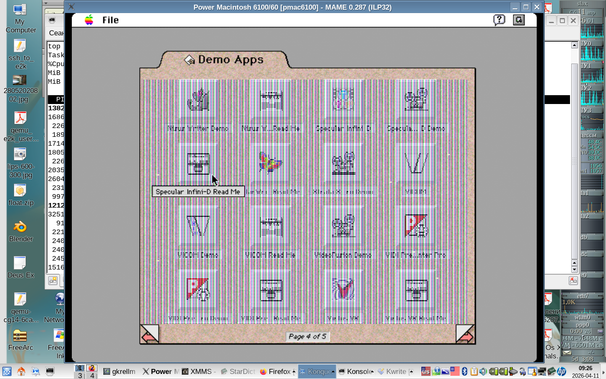
I wonder if this strange stripping background in Demos page (second and next ones) from 7.1.2 CD actually bug or just known imprefection?
Does it behave the same on ILP64 ?
Code: Select all
./mame pmac6100 -window -drc_use_c -cdrom1 Apple\ Mac\ OS\ 7.1.2\ \(PowerMac\ 6100\ 7100\ 8100\)\ \(ISO\)/Power\ Macintosh\ 61\ 71\ 81\ CD.iso
Re: MAME Power Macintosh 6100 boots!
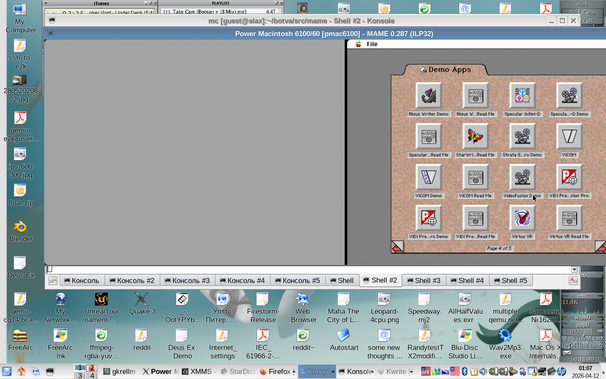
Second page in Demos works with second display set to millions of colors:Andrew_R wrote: Sat Apr 11, 2026 6:44 am This is using MAME c6cdeb1e4af49e3e7c4bc41f761e0e956097ee82 but on i686 system (Slackware 15.0)
I wonder if this strange stripping background in Demos page (second and next ones) from 7.1.2 CD actually bug or just known imprefection?
Code: Select all
./mame pmac6100 -ramsize 72M -nbe mdc824 -window -drc_use_c -cdrom Apple\ Mac\ OS\ 7.1.2\ \(PowerMac\ 6100\ 7100\ 8100\)\ \(ISO\)/Power\ Macintosh\ 61\ 71\ 81\ CD.iso -hard1 mac710-local.chd
So far it works, but at times I get black screen like in
https://github.com/mamedev/mame/issues/14191
removing nvram file for pmac6100 machine helps in this case.