Tiger for Intel on VMs

Anything about Mac emulation that does not belong in the above categories.

Moderators: Cat_7, Ronald P. Regensburg

User avatar
Lucss21a
Inquisitive Elf
Posts: 28
Joined: Sat Mar 05, 2022 1:03 pm

Tiger for Intel on VMs

Post by Lucss21a »

So I decided to hopped into virtualizing x86 macOS. I decided to try out 10.4 but actually disappointed on the way that my iso boots via BIOS instead of usual EFI.

So I dug deep into some restore DVDs, and found nothing that boots. I tried the one from OpenCore and it refuses to work under Qemu-system-i386 (the system crashes with a panic under OpenCore), VirtualBox (stuck in

Code: Select all

Still finding root device...
limbo) and VMWare (doesn't seem to support non-server Mac OS X 10.4-6).

I need some answers, and possible solutions I could try. I'm running under openSUSE Tumbleweed if you are curious.

Note: This describes my problems with only the Intel-based EFI Mac OS X Tiger 10.4.4 and above Recovery (Gray/Grey) DVDs. In this case, it's a disk image of 10.4.10 from OpenCore which has the SMBIOS patched out. It doesn't work. What does work are the PPC copies (since day 1). Other versions of OS X for Intel seems to boot in VirtualBox.
User avatar
adespoton
Forum All-Star
Posts: 4727
Joined: Fri Nov 27, 2009 5:11 am
Location: Emaculation.com

Re: Tiger for Intel on VMs

Post by adespoton »

What's your host system? Which VM app are you using?

Intel Tiger Retail 10.4.7 and up works on VMWare Fusion (with a hack to make it think it's Tiger Server), Parallels Desktop, VirtualBox (with some extra parameters added to the config file) and QEMU-x86 (using virtualization, not using TCG) using EFI boot.

It does NOT work under QEMU TCG, which means it won't emulate correctly on Apple Silicon, just virtualize x86-based computers.

Finding all the components you need to tweak to get it working can take a while; I figured it out over a 10 year period (things kept changing). Let me know if you need assistance, once you've got a Retail image. Things go a lot smoother if you instead use Tiger Server 10.4.7+, as the VM licensing issues don't exist.

Having said all that, Tiger SHOULD be able to work with QEMU TCG with the proper OpenCore config -- but I haven't been able to identify what it needs to patch that TCG isn't providing by default yet. And I've been working on that for 3 years now.
User avatar
Lucss21a
Inquisitive Elf
Posts: 28
Joined: Sat Mar 05, 2022 1:03 pm

Re: Tiger for Intel on VMs

Post by Lucss21a »

adespoton wrote: Fri Jan 12, 2024 4:53 pm What's your host system? Which VM app are you using?

Intel Tiger Retail 10.4.7 and up works on VMWare Fusion (with a hack to make it think it's Tiger Server), Parallels Desktop, VirtualBox (with some extra parameters added to the config file) and QEMU-x86 (using virtualization, not using TCG) using EFI boot.

It does NOT work under QEMU TCG, which means it won't emulate correctly on Apple Silicon, just virtualize x86-based computers.

Finding all the components you need to tweak to get it working can take a while; I figured it out over a 10 year period (things kept changing). Let me know if you need assistance, once you've got a Retail image. Things go a lot smoother if you instead use Tiger Server 10.4.7+, as the VM licensing issues don't exist.

Having said all that, Tiger SHOULD be able to work with QEMU TCG with the proper OpenCore config -- but I haven't been able to identify what it needs to patch that TCG isn't providing by default yet. And I've been working on that for 3 years now.
I use vanilla QEMU-system-i386, with an openSUSE Tumbleweed Linux Host. The ISO is the same ISO as the one provided on the Legacy OSes in the OpenCore Docs. I have VMware Workstation 17 and VirtualBox 7 for the other ones.

I might also try the Tiger Server DVD if I couldn't get the Client version working. I'm still conflicted with the differences between Server and Client since I planned on doing a comparison between 10.4 PPC and 10.4 Intel.
User avatar
adespoton
Forum All-Star
Posts: 4727
Joined: Fri Nov 27, 2009 5:11 am
Location: Emaculation.com

Re: Tiger for Intel on VMs

Post by adespoton »

Lucss21a wrote: Sat Jan 13, 2024 5:16 am
adespoton wrote: Fri Jan 12, 2024 4:53 pm What's your host system? Which VM app are you using?

Intel Tiger Retail 10.4.7 and up works on VMWare Fusion (with a hack to make it think it's Tiger Server), Parallels Desktop, VirtualBox (with some extra parameters added to the config file) and QEMU-x86 (using virtualization, not using TCG) using EFI boot.

It does NOT work under QEMU TCG, which means it won't emulate correctly on Apple Silicon, just virtualize x86-based computers.

Finding all the components you need to tweak to get it working can take a while; I figured it out over a 10 year period (things kept changing). Let me know if you need assistance, once you've got a Retail image. Things go a lot smoother if you instead use Tiger Server 10.4.7+, as the VM licensing issues don't exist.

Having said all that, Tiger SHOULD be able to work with QEMU TCG with the proper OpenCore config -- but I haven't been able to identify what it needs to patch that TCG isn't providing by default yet. And I've been working on that for 3 years now.
I use vanilla QEMU-system-i386, with an openSUSE Tumbleweed Linux Host. The ISO is the same ISO as the one provided on the Legacy OSes in the OpenCore Docs. I have VMware Workstation 17 and VirtualBox 7 for the other ones.

I might also try the Tiger Server DVD if I couldn't get the Client version working. I'm still conflicted with the differences between Server and Client since I planned on doing a comparison between 10.4 PPC and 10.4 Intel.
I guess I should have been clearer: what is your host hardware architecture? If you're running x86-64, then QEMU-system-i386 (or KVM) should be able to run the iso under virtualization. If you're running on an ARM variant, you'll be using the TCG emulator and I haven't figured out how to get this to boot anything below OS X 10.7 yet.

Based on the fact that you're using VMware and VBox 7, I assume you are fully in x86-land, which means virtualization should be available. However, because you're running Linux, you'll need to do some extra legwork to bypass the "please don't pirate" feature that tests for Apple hardware. OpenCore can help with that. You're essentially creating a virtual Hackintosh, and so will need to deal with all the standard Hackintosh issues on top of the virtualization/emulation issues.

VMware Workstation won't virtualize OS X (only VMware Fusion will do that); VirtualBox 7 WILL do the trick without a Hackintosh system, but needs a bunch of extra data injected into the config file instead.

Following the ModifyVM commands on https://github.com/ranma42/TigerOnVBox should get you most of the way towards booting Tiger on Linux; you may still need to add the special string that indicates it's on Apple hardware; https://github.com/kholia/OSX-KVM and https://gist.github.com/CyberShadow/b50 ... 9d1398340f may help with that.
User avatar
Lucss21a
Inquisitive Elf
Posts: 28
Joined: Sat Mar 05, 2022 1:03 pm

Re: Tiger for Intel on VMs

Post by Lucss21a »

adespoton wrote: Mon Jan 15, 2024 4:39 pm
Lucss21a wrote: Sat Jan 13, 2024 5:16 am
adespoton wrote: Fri Jan 12, 2024 4:53 pm What's your host system? Which VM app are you using?

Intel Tiger Retail 10.4.7 and up works on VMWare Fusion (with a hack to make it think it's Tiger Server), Parallels Desktop, VirtualBox (with some extra parameters added to the config file) and QEMU-x86 (using virtualization, not using TCG) using EFI boot.

It does NOT work under QEMU TCG, which means it won't emulate correctly on Apple Silicon, just virtualize x86-based computers.

Finding all the components you need to tweak to get it working can take a while; I figured it out over a 10 year period (things kept changing). Let me know if you need assistance, once you've got a Retail image. Things go a lot smoother if you instead use Tiger Server 10.4.7+, as the VM licensing issues don't exist.

Having said all that, Tiger SHOULD be able to work with QEMU TCG with the proper OpenCore config -- but I haven't been able to identify what it needs to patch that TCG isn't providing by default yet. And I've been working on that for 3 years now.
I use vanilla QEMU-system-i386, with an openSUSE Tumbleweed Linux Host. The ISO is the same ISO as the one provided on the Legacy OSes in the OpenCore Docs. I have VMware Workstation 17 and VirtualBox 7 for the other ones.

I might also try the Tiger Server DVD if I couldn't get the Client version working. I'm still conflicted with the differences between Server and Client since I planned on doing a comparison between 10.4 PPC and 10.4 Intel.
I guess I should have been clearer: what is your host hardware architecture? If you're running x86-64, then QEMU-system-i386 (or KVM) should be able to run the iso under virtualization. If you're running on an ARM variant, you'll be using the TCG emulator and I haven't figured out how to get this to boot anything below OS X 10.7 yet.

Based on the fact that you're using VMware and VBox 7, I assume you are fully in x86-land, which means virtualization should be available. However, because you're running Linux, you'll need to do some extra legwork to bypass the "please don't pirate" feature that tests for Apple hardware. OpenCore can help with that. You're essentially creating a virtual Hackintosh, and so will need to deal with all the standard Hackintosh issues on top of the virtualization/emulation issues.

VMware Workstation won't virtualize OS X (only VMware Fusion will do that); VirtualBox 7 WILL do the trick without a Hackintosh system, but needs a bunch of extra data injected into the config file instead.

Following the ModifyVM commands on https://github.com/ranma42/TigerOnVBox should get you most of the way towards booting Tiger on Linux; you may still need to add the special string that indicates it's on Apple hardware; https://github.com/kholia/OSX-KVM and https://gist.github.com/CyberShadow/b50 ... 9d1398340f may help with that.
I have a x64 system, I forgot to mention. I also couldn't find an OpenCore image that could be ran under virtualization solutions, as the one that I have already crashes KVM (it's on a guide for running modern macOS on UTM tho, but it provides i386 binaries), which I think is an outdated one, so I might ask if you have the latest one, on a working disk image that I could mount.
joevt
Tinkerer
Posts: 76
Joined: Mon Feb 01, 2010 3:08 am

Re: Tiger for Intel on VMs

Post by joevt »

Parallels Desktop for Mac can boot everything from 10.5 onward. 10.5 and 10.6 use a script added to the disk image to get around the Mac OS X Server requirement.

I couldn't get 10.4.11 to work with Parallels so I used Virtual Box for that. Maybe it could work with Parallels if there was a way to modify CPU_ID or whatever like Virtual Box can.

I created the disk images by cloning partitions which have macOS already installed on them. These came from my Mac Pro 2008 which ran all versions of macOS from Tiger to Monterey.

The virtual machines run on my Skylake Hackintosh.
User avatar
Lucss21a
Inquisitive Elf
Posts: 28
Joined: Sat Mar 05, 2022 1:03 pm

Re: Tiger for Intel on VMs

Post by Lucss21a »

In the meantime, I tried setting up the i386 OpenCore disk image by formatting a 200MB disk image and setting it up from there. I mounted it as a loopback device to perform file transfer activities and well

Image
User avatar
Lucss21a
Inquisitive Elf
Posts: 28
Joined: Sat Mar 05, 2022 1:03 pm

Re: Tiger for Intel on VMs

Post by Lucss21a »

So I fixed some of the OpenCore issues except one shown in this linked video, which is under QEMU KVM and TCG.

I would also provide my commands here for reference:

Code: Select all

qemu-system-i386 -machine pc -accel kvm \
        -bios OVMF.bin -m 2048 \
        -cpu Penryn,vendor=GenuineIntel,vmware-cpuid-freq=on,+ssse3,+sse4.1,+sse4.2,+popcnt,+avx,+aes,+xsave,+xsaveopt,check \
        -smp 4,cores=2 \
        -usb -device usb-kbd -device usb-mouse \
        -device isa-applesmc,osk="<put osk key here>" \
        -netdev user,id=usr0 -device e1000-82545em,netdev=usr0,id=vnet0 \
        -device ahci,id=sata \
        -drive id=Hard,if=none,format=qcow2,file="tigerx86.qcow2" \
        -device ide-hd,bus=sata.1,drive=Hard \
        -drive id=OpenCore,if=none,format=raw,file="opencore.img" \
        -device ide-hd,bus=sata.2,drive=OpenCore \
        -drive id=CD,if=none,format=raw,file="intel acdt.img" \
        -device ide-hd,bus=sata.0,drive=CD \
        -device usb-ehci,id=ehci \
        -device vmware-svga \
        -monitor stdio
User avatar
adespoton
Forum All-Star
Posts: 4727
Joined: Fri Nov 27, 2009 5:11 am
Location: Emaculation.com

Re: Tiger for Intel on VMs

Post by adespoton »

Which OpenCore and ACDT images are you using?
User avatar
Lucss21a
Inquisitive Elf
Posts: 28
Joined: Sat Mar 05, 2022 1:03 pm

Re: Tiger for Intel on VMs

Post by Lucss21a »

adespoton wrote: Wed Jan 17, 2024 8:09 pm Which OpenCore and ACDT images are you using?
The OpenCore image I use was a self made one, using the guide, 200MB in size.

The ACDT one is this one.
User avatar
adespoton
Forum All-Star
Posts: 4727
Joined: Fri Nov 27, 2009 5:11 am
Location: Emaculation.com

Re: Tiger for Intel on VMs

Post by adespoton »

Lucss21a wrote: Wed Jan 17, 2024 11:01 pm
adespoton wrote: Wed Jan 17, 2024 8:09 pm Which OpenCore and ACDT images are you using?
The OpenCore image I use was a self made one, using the guide, 200MB in size.

The ACDT one is this one.
If you get it fully booting, please do let me know so I can roll it into my UTM config project. And feel free to have a go at 10.5 and 10.6 as well :)
kikyoulinux
Tinkerer
Posts: 92
Joined: Sun Sep 28, 2014 11:53 am

Re: Tiger for Intel on VMs

Post by kikyoulinux »

Image
Image
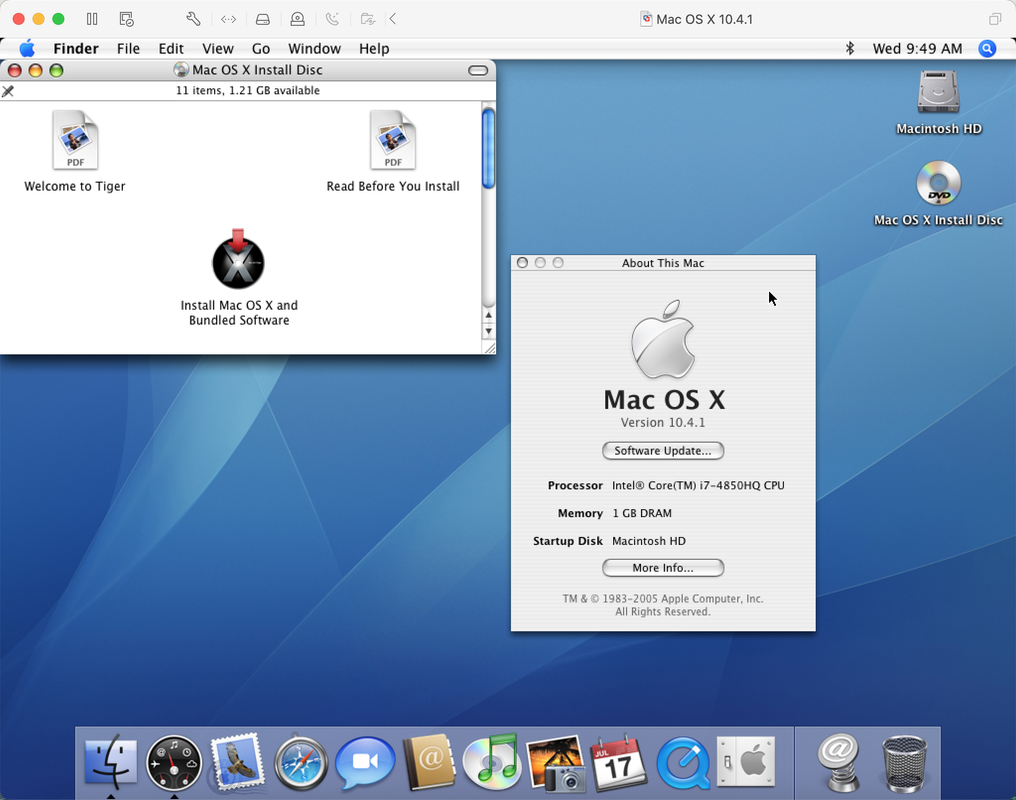
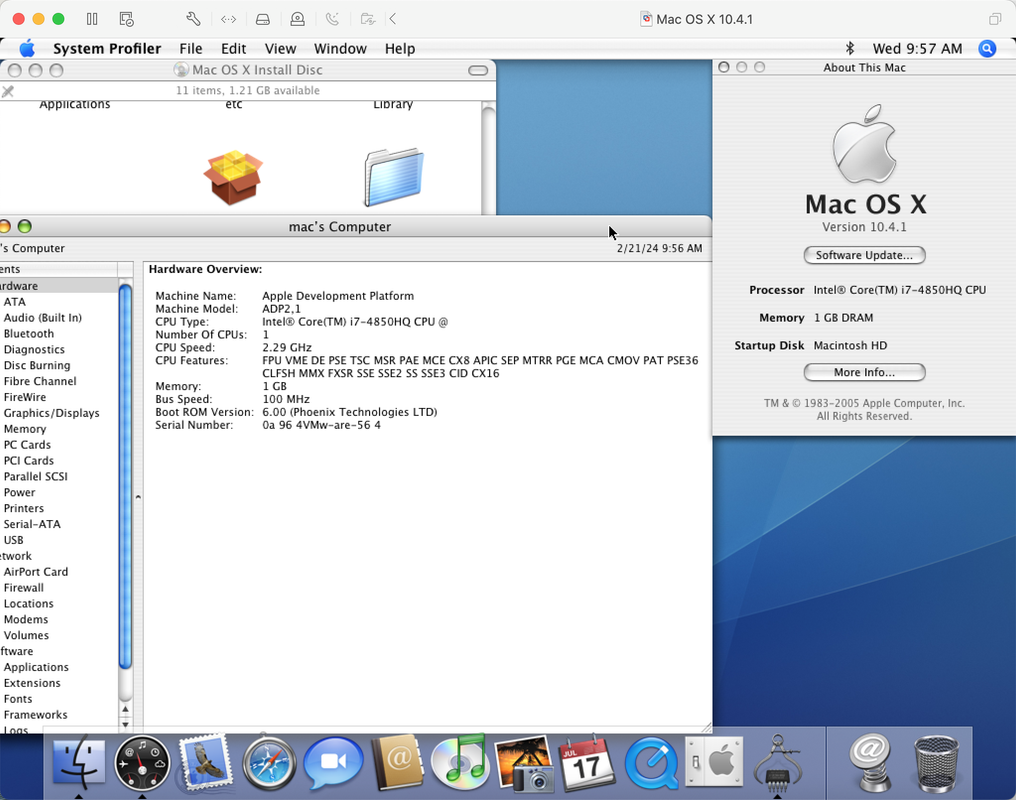
There's a 10.4.1 image on archive.org and it works well on vmware fusion. This image might be a cracked one for Intel Mac DTK.
User avatar
adespoton
Forum All-Star
Posts: 4727
Joined: Fri Nov 27, 2009 5:11 am
Location: Emaculation.com

Re: Tiger for Intel on VMs

Post by adespoton »

Tiger for Intel works fine on VMWare Fusion x86, VirtualBox x86 and Parallels Desktop x86, and has done for over a decade. There's one tweak you need to make on VMWare to allow it to boot: add a single file to the System folder that makes VMWare think it's the Server version of Tiger. Once you've booted, you can remove the file, reboot, snapshot the image, and it will report itself properly as the consumer version. I've installed from original media multiple times using this method over the years.

A while back, I got a note from someone who said they'd figured out how to get Tiger running in QEMU TCG (the emulator instead of the VM) -- it requires some changes in the OpenCore EFI config. So far, I haven't got it working on my M1 Mac, however. I've still got to get some time when we're both free to sort out exactly what needs to be updated in the OpenCore config to get TCG running correctly on M1 Macs, and then I'll update my public configs with a bootable Tiger setup.
joevt
Tinkerer
Posts: 76
Joined: Mon Feb 01, 2010 3:08 am

Re: Tiger for Intel on VMs

Post by joevt »

adespoton wrote: Wed Feb 21, 2024 4:39 pm Tiger for Intel works fine on VMWare Fusion x86, VirtualBox x86 and Parallels Desktop x86, and has done for over a decade. There's one tweak you need to make on VMWare to allow it to boot: add a single file to the System folder that makes VMWare think it's the Server version of Tiger. Once you've booted, you can remove the file, reboot, snapshot the image, and it will report itself properly as the consumer version. I've installed from original media multiple times using this method over the years.

A while back, I got a note from someone who said they'd figured out how to get Tiger running in QEMU TCG (the emulator instead of the VM) -- it requires some changes in the OpenCore EFI config. So far, I haven't got it working on my M1 Mac, however. I've still got to get some time when we're both free to sort out exactly what needs to be updated in the OpenCore config to get TCG running correctly on M1 Macs, and then I'll update my public configs with a bootable Tiger setup.
Can you get Tiger to work in the latest Parallels version on a modern Intel Mac? I have every other macOS version working in Parallels 19.2.1 on a Skylake hackintosh. Tiger 10.4.11 works in VirtualBox.

For 10.4, 10.5, 10.6, the following changes are made:

Code: Select all

echo '/bin/rm /System/Library/CoreServices/ServerVersion.plist' >> "${thevolume}/etc/rc.local"
echo '/bin/cp /System/Library/CoreServices/SystemVersion.plist /System/Library/CoreServices/ServerVersion.plist' >> "${thevolume}/etc/rc.shutdown.local"
cp "${thevolume}/System/Library/CoreServices/SystemVersion.plist" "${thevolume}/System/Library/CoreServices/ServerVersion.plist"
So with these changes, the volume has a ServerVersion.plist file (a copy of the SystemVersion.plist file) which makes Parallels accept the volume. That file is removed during boot so macOS won't think it's a server version. That file is recreated at shutdown so Parallels will accept the volume next time you want to boot. If a problem occurs while the ServerVersion.plist doesn't exist, then you just need to recreate that file.

Maybe OpenCore can be used to make 10.4.11 work with Parallels?

For 10.5.8, there may be an issue with CPU usage. Just install NullCPUPM. To fix launchd errors in Console.app, set KeepAlive to false in /Library/LaunchDaemons/com.parallels.TimeSync.plist. Both solutions are described at
https://forum.parallels.com/threads/mac ... -8.350983/

For 10.6.8, to fix missing usbmuxd problem (caused by installing Xcode?), reinstall iTunes 11.4. Preview.app can’t view png or jpg files. It will crash if you try to resize the window. Works with pdfs though.

I use normal disk images so I can mount them outside of Parallels. The disk images were cloned from existing installations that I had installed on a Mac Pro 2008. Then prl_disk_tool is used to create a virtual hard disk that points to the dmg.

Code: Select all

# Create a hdd which points to a dmg using a relative path

cd "/Volumes/FreeBig/DiskImages"

# Create the dmg files with sizes larger than the source partition
mkfile -n $(((41000000000 + 0x100000 - 1) & -0x100000)) Tiger.dmg
mkfile -n $(((44000000000 + 0x100000 - 1) & -0x100000)) Leopard.dmg
mkfile -n $(((44000000000 + 0x100000 - 1) & -0x100000)) SnowLeopard.dmg
mkfile -n $(((70000000000 + 0x100000 - 1) & -0x100000)) Lion.dmg
mkfile -n $(((65000000000 + 0x100000 - 1) & -0x100000)) Yosemite.dmg
mkfile -n $(((65000000000 + 0x100000 - 1) & -0x100000)) ElCapitan.dmg
mkfile -n $(((60000000000 + 0x100000 - 1) & -0x100000)) Sierra.dmg
mkfile -n $(((66000000000 + 0x100000 - 1) & -0x100000)) HighSierra.dmg
mkfile -n $(((71000000000 + 0x100000 - 1) & -0x100000)) MountainLion.dmg
mkfile -n $(((92000000000 + 0x100000 - 1) & -0x100000)) Mavericks.dmg

# Create a GPT partition map using gdisk
for thedisk in Tiger Leopard SnowLeopard Lion MountainLion Mavericks Yosemite ElCapitan Sierra HighSierra ; do
	printf "%s\n" 'printf "o\nY\nw\nY\n" | sudo gdisk "'${thedisk}.dmg'" > /dev/null && echo good || echo bad'
done

# Erase the disks using diskutil to create EFI and single partition
for thedisk in Tiger Leopard SnowLeopard Lion MountainLion Mavericks Yosemite ElCapitan Sierra HighSierra ; do
	printf "%s\n" 'diskutil partitionDisk $(hdiutil attach -nomount "'"${thedisk}.dmg"'" | sed -n '"'"'1 { s/ .*//p ; }'"'"') GPT HFSX "'"${thedisk}New"'" 0'
done

# Use the asr command to restore the source partition to the destination dmg
# asr restore --source sourcevolume --target destvolume

# Use prl_disk_tool to create a hdd wrapper for the dmg (requires you to keep the dmg)
for thedmg in *.dmg ; do
	prl_disk_tool create --hdd "$(pwd)/${thedmg/.dmg/.hdd}" --dmg "$(stat -f %R "$thedmg")"
done
Nerak99
Space Cadet
Posts: 3
Joined: Sun Mar 10, 2024 10:06 pm

Re: Tiger for Intel on VMs

Post by Nerak99 »

What does the " just virtualize x86-based computers" bit mean?
adespoton wrote: Fri Jan 12, 2024 4:53 pm
It does NOT work under QEMU TCG, which means it won't emulate correctly on Apple Silicon, just virtualize x86-based computers.
User avatar
adespoton
Forum All-Star
Posts: 4727
Joined: Fri Nov 27, 2009 5:11 am
Location: Emaculation.com

Re: Tiger for Intel on VMs

Post by adespoton »

Nerak99 wrote: Tue Mar 12, 2024 7:58 am What does the " just virtualize x86-based computers" bit mean?
adespoton wrote: Fri Jan 12, 2024 4:53 pm
It does NOT work under QEMU TCG, which means it won't emulate correctly on Apple Silicon, just virtualize x86-based computers.
When you run QEMU, you have the option to use the TCG emulator, or use the host CPU, GPU and memory via passthrough with emulated virtual hardware devices.

If you're running QEMU on x86 hardware, it defaults to just using that hardware if you're creating an x86-based machine. Since it's real hardware, it is fully implemented, and everything just works.

If you intentionally use TCG instead (via a command line flag), there are some hardware features that haven't been fully/properly implemented, and OS X 10.4-10.6 depend on some of these features.

However, OpenCore has EFI drivers that work around most of these issues, so you can theoretically use the correct OpenCore EFI configuration plus TCG to run those OSes.

I say theoretically because every time I've seen someone say "I got Tiger x86 working in QEMU!" when I've investigated, it's turned out that it was:

a) Tiger PPC

b) Tiger running on x86 in virtualization, not using the TCG emulator (so essentially running Tiger in a virtual machine, not in an emulator)

c) not reproducible (they likely didn't get it fully running)
User avatar
Lucss21a
Inquisitive Elf
Posts: 28
Joined: Sat Mar 05, 2022 1:03 pm

Re: Tiger for Intel on VMs

Post by Lucss21a »

Sorry for necrobumping this thread (frankly I have drifted away from the Mac emulation scene and obviously not had been updated to any progress happening), but I may investigate this one for the matter:

https://docs.darwinkvm.com/

EDIT: It claims to be able to use KVM virtualization on Tiger for x86, using the virt-manager setup as well as normal QEMU. I tested a guide for Cheetah 10.0.4 and it does work, however I will currently test their own Tiger x86 tutorial if they used a different bootloader or a cracked image.
User avatar
adespoton
Forum All-Star
Posts: 4727
Joined: Fri Nov 27, 2009 5:11 am
Location: Emaculation.com

Re: Tiger for Intel on VMs

Post by adespoton »

Yes, as mentioned above, using virtualization under QEMU to run OS X x86 is a solved issue (or was never an issue, depending on how you look at it). The challenge is emulating OS X 10.4-10.6 x86 under TCG.

However, that issue is now solved for 10.6; turns out it was fixable by setting ICH9-LPC.disable_s3. So now at some point I need to go back through 10.4 and 10.5 to see if this change is all that's needed for them as well -- I suspect it isn't.
typo
Space Cadet
Posts: 6
Joined: Fri Aug 29, 2025 3:58 pm

Re: Tiger for Intel on VMs

Post by typo »

Hi all,

I'm new here and have been watching this forum for years learning from it but now I am joining :-)

I am posting because I want to migrate my 10.4.11 macOS Tiger server setup from my old Macbook 2.1 that needs to retire to a virtual machine in preferably Parallels 14, or alternatively VMware Fusion version 11.5 running on a 2012 MBP 13" i5 under Catalina. Parallels is downgraded to 14 due to bugs in the VirtIO-Net driver causing issues with other VMs). So an Intel Tiger Server. I am using it for Netbooting my old Macs and providing filesharing services :-).

I managed to get 10.4.7 Server running under VirtualBox, however it has many issues, is buggy and cannot be updated to 10.4.11 without the entire thing crashing the virtual machine. And VirtualBox seems super sluggish so I would like to move it into my Parallels where I have my other VMs running 24/7 or alternatively VMware Fusion (if Parallels just is not possible). I've spent days on this, getting nowhere, trying all kinds of fixes with CPU type changes, EFI files and everything. I also tried many different ISOs of the Tiger server and to clone my existing installation from my Macbook and other things.

Places like this:
viewtopic.php?t=12072 and many other threads
https://docs.darwinkvm.com/docs/01-Welc ... ments.html
https://www.downtowndougbrown.com/2017/ ... th-vmware/
https://lili.lgbt/en/tiger.php
https://www.betaarchive.com/forum/viewtopic.php?t=45466
https://www.insanelymac.com/forum/topic ... rkstation/

If figured if adespoton and you others here who have been doing this for years can't make this work, I'll throw the towel and give up at this point . So hope someone knows how to make this work so I can retire at least some of these old powerhungry machines :-)

@adespoton it sounded like you mentioned "using virtualization under QEMU to run OS X x86 is a solved issue"? I couldn't make anything work? I am very interested.
Last edited by typo on Fri Aug 29, 2025 4:24 pm, edited 1 time in total.
User avatar
Cat_7
Expert User
Posts: 6557
Joined: Fri Feb 13, 2004 8:59 am
Location: Sittard, The Netherlands

Re: Tiger for Intel on VMs

Post by Cat_7 »

Too bad you could not yet get a Tiger server running. You didn't mention which version of macOS you run on the i5.
Using Qemu might be difficult as Qemu only supports the latest two macOS versions.

Not that it is any help to you, but I just managed to get a Tiger 10.4.7 Server running on VMWare player in Windows, using only the efi32-srv.rom mentioned in several guides and adding these for 4 lines to the vmware vmx file:
cpuid.2.ebx="------------------------00101100"
cpuid.2.ecx="001100000010000101001010--------"
efi32.filename = "efi32-srvr.rom"
hw.model="iMac5,1"

The server could be updated to 10.4.11 with no issue at all. I have no Intel Mac to repeat that with VMWare Fusion.

Best,
Cat_7
joevt
Tinkerer
Posts: 76
Joined: Mon Feb 01, 2010 3:08 am

Re: Tiger for Intel on VMs

Post by joevt »

For using the Mac OS X 10.4.11 partition of my MacPro3,1, I created a VirtualBox VM (on macOS Monterey) and made the following changes which are documented elsewhere:

Code: Select all

# First, create the disk:
VBoxManage convertfromraw "/Volumes/FreeBig/DiskImages/Tiger.dmg" "/Volumes/FreeBig/DiskImages/Tiger.vmdk" --format VMDK

# Create the VM using the disk.

# Execute these commands to modify the VM:
thevm="Mac OS X 10.4.11 Tiger"
VBoxManage modifyvm "$thevm" --mouse usb
VBoxManage modifyvm "$thevm" --firmware efi
VBoxManage modifyvm "$thevm" --cpu-profile 'Intel Pentium 4 3.00GHz'
VBoxManage modifyvm "$thevm" --cpuidset 00000000 00000004 756e6547 6c65746e 49656e69
VBoxManage modifyvm "$thevm" --cpuidset 00000001 00000f43 00020800 fbffffff ffffffff
VBoxManage modifyvm "$thevm" --cpuidset 80000001 00000000 00000000 ffffffff ffffffff
VBoxManage setextradata "$thevm" VBoxInternal/Devices/efi/0/Config/DmiBIOSVersion EFI32..Virtual.Box
VBoxManage setextradata "$thevm" VBoxInternal/Devices/efi/0/Config/DmiUseHostInfo 0
VBoxManage setextradata "$thevm" VBoxInternal/Devices/smc/0/Config/GetKeyFromRealSMC 1
VBoxManage setextradata "$thevm" VBoxInternal2/EfiGraphicsResolution 1920x1200
I haven't used it much so I can't say how well it works.
For Parallels Desktop 20 for Mac, I can only get 10.5.8 and later to work. I don't know if there's any hidden settings that will let 10.4.11 work. A simple modification can get non-server versions of 10.5 and 10.6 to work.
typo
Space Cadet
Posts: 6
Joined: Fri Aug 29, 2025 3:58 pm

Re: Tiger for Intel on VMs

Post by typo »

Hi, thanks for the answers:

@Cat_7 I run on Catalina 10.15.8. What exact machine settings do you use in VMware? I think I have tried everything. If I have those exact settings I can retry with your fixes (which starting machine template and which CPU details and SATA or IDE for CD-ROM and disks? And do you add any bootloader image. I tried with and without the efi file earlier but I understood that it was to trick a retail Tiger to show up as a Tiger server wasn't it, or? Anyway, i couldn't get it to work with that either.

@joevt I have already got it running in VirtualBox but it runs very bad and unstable and I can't update it to 10.4.11 so it's not that useable (if I update it won't boot at all). But maybe your settings will make it more stable, but VirtualBox is just very heavy on the CPU on this machine compared to Parallels and VMware.

It seems that Tiger for Intel is the exact version I can't find any working solutions for and most else on PPC and Intel seems to work :-) To bad I need Tiger Server.

UPDATE: I forgot to mention that I only managed to get Tiger Retail 10.4.7 installed on VBox - not Tiger Server. And I need Tiger Server for this project unfortunately.
User avatar
Cat_7
Expert User
Posts: 6557
Joined: Fri Feb 13, 2004 8:59 am
Location: Sittard, The Netherlands

Re: Tiger for Intel on VMs

Post by Cat_7 »

I created a Leopard server 32 bit machine. It uses 1Gb memory, 1 cpu, and two sata disks: hd (40Gb in my case) and cdrom. So nothing special, this all seems standard.
Then downloaded efi32-srv.rom from here: https://github.com/jtergogit/unlocker20 ... 2-srvr.rom and put it in the VM folder.
I used the Tiger server 10.4.7.iso as installation medium. That is download 11 on this page: https://macintoshgarden.org/apps/mac-os-server-104

I created the machine but did not start it and shut down VMWare completely. This is important as VMWare might overwrite your edits to the vmx file. I then I edited the vmx file and added:
cpuid.2.ebx="------------------------00101100"
cpuid.2.ecx="001100000010000101001010--------"
efi32.filename = "efi32-srvr.rom"
hw.model="iMac5,1"

Then started VMWare and started the VM.

Come to think about it, the efi32-srv.rom trick is only needed to install a non-server version, while you are already trying to install a server version. So it might not be needed. Commenting out the line efi32.filename = "efi32-srvr.rom" in the vmx file still allows me to boot the server.

Good luck,
Cat_7
typo
Space Cadet
Posts: 6
Joined: Fri Aug 29, 2025 3:58 pm

Re: Tiger for Intel on VMs

Post by typo »

Hi again @Cat_7,

Thanks, this server DVD was actually the one I have tried on all my different installations. Inow tried exactly those specs in VMware Fusion 11.5 and then it shows:
Attempting to start up from:
+ EFI UMware Virtual SATA CDROM Drive (1.0) ... unsuccessful.
EFI UMware Virtual SATA Hard Drive (0.0) ... unsuccessful.

EFI Network...

And ends up at the boot manager. I get a "no operating system found alert". "No operating system was found.
Check your Startup Disk in the virtual machine settings. If you have not installed an operating system yet, you can choose an installation disc or disc image in the CD/DVD settings and restart the virtual machine."

The options are

EFI UMware Virtual SATA Hard Drive (0.0(
EFI UMuare Virtual SATA CDROM Drive (1.0)
EFI Network EFI Internal Shell (Unsupported option)

Choosing any of the boot manager options don't work.

With the EFI file I get an Apple grey boot background with the VMware logo. But without this file I do not get it, I only get like a black background. But the error text is the same actually so It does not seem like the EFI file does anything but change the background in this case.

But I noticed that Fusion has a compatibility section where I can choose a hardware version. I can choose up to 16 which includes Fusion 11.5 or Workstation 15.x. I wonder which version of Workstation exactly you're using because maybe I can put it to that as well because I would imagine they're using the same engine on Windows and Mac. So which version are you using of Workstation exactly - or of vmWare Player? And have you set any compatibility option in yours?

UPDATE: I tried to make the discs and cd both SATA and IDE - nothing changes. The issue is the EFI boot stuff. I wonder if there is a flag.
UPDATE 2: I got it to boot the CD :-O Now installing! Experimented with setting the cdrom to IDE and the hdd to SATA (as the old MacBooks), and then I downloaded and switched to the efi64-srvr.rom instead of the 32 bit version. However the CD-ROM is now SATA again in fusion.

I have both:
sata0.present = "TRUE"
sata0:0.fileName = "Virtual Disk.vmdk"
sata0:0.present = "TRUE"
sata0:1.deviceType = "cdrom-image"
sata0:1.fileName = "/Volumes/Repo/Installers_ISO/macOS/template/iso/MAC_OS_X_10-4-7_TIGER_SERVER.ISO"
sata0:1.startConnected = "FALSE"

and

bios.bootOrder = "CDROM"
ide0:0.deviceType = "cdrom-image"
ide0:0.fileName = "/Volumes/Repo/Installers_ISO/macOS/template/iso/MAC_OS_X_10-4-7_TIGER_SERVER.ISO"
ide0:0.startConnected = "FALSE"

And then I have this still:

cpuid.2.ebx="------------------------00101100"
cpuid.2.ecx="001100000010000101001010--------"
# efi32.filename = "efi32-srvr.rom"
efi64.filename = "efi64-srvr.rom"
hw.model="iMac5,1"

Much appreciated! Thanks so much for the help! 🙏🙌

I will update you when I get it installed and I check how it runs.
User avatar
Cat_7
Expert User
Posts: 6557
Joined: Fri Feb 13, 2004 8:59 am
Location: Sittard, The Netherlands

Re: Tiger for Intel on VMs

Post by Cat_7 »

My VMWare player is version 17.
In the vmx file I see virtualHW.version = "21"

(note my host is a 12th gen I7)

These were my initial settings:
.encoding = "windows-1252"
config.version = "8"
virtualHW.version = "21"
pciBridge0.present = "TRUE"
pciBridge4.present = "TRUE"
pciBridge4.virtualDev = "pcieRootPort"
pciBridge4.functions = "8"
pciBridge5.present = "TRUE"
pciBridge5.virtualDev = "pcieRootPort"
pciBridge5.functions = "8"
pciBridge6.present = "TRUE"
pciBridge6.virtualDev = "pcieRootPort"
pciBridge6.functions = "8"
pciBridge7.present = "TRUE"
pciBridge7.virtualDev = "pcieRootPort"
pciBridge7.functions = "8"
vmci0.present = "TRUE"
hpet0.present = "TRUE"
nvram = "TigerServer 32-bit.nvram"
virtualHW.productCompatibility = "hosted"
gui.exitOnCLIHLT = "FALSE"
powerType.powerOff = "soft"
powerType.powerOn = "soft"
powerType.suspend = "soft"
powerType.reset = "soft"
displayName = "TigerServer 32-bit"
usb.vbluetooth.startConnected = "TRUE"
smc.present = "TRUE"
smbios.restrictSerialCharset = "TRUE"
firmware = "efi"
guestOS = "darwin"
board-id.reflectHost = "TRUE"
ich7m.present = "TRUE"
tools.syncTime = "FALSE"
cpuid.coresPerSocket = "1"
memsize = "1024"
sata0.present = "TRUE"
sata0:0.fileName = "TigerServer 32-bit.vmdk"
sata0:0.present = "TRUE"
sata0:1.deviceType = "cdrom-image"
sata0:1.fileName = "C:\mac-iso\TigerIntel-10.4.7_server.iso"
sata0:1.present = "TRUE"
usb.present = "TRUE"
ehci.present = "TRUE"
ethernet0.connectionType = "custom"
ethernet0.addressType = "generated"
ethernet0.virtualDev = "e1000"
ethernet0.present = "TRUE"
extendedConfigFile = "TigerServer 32-bit.vmxf"
floppy0.present = "FALSE"
cpuid.2.ebx="------------------------00101100"
cpuid.2.ecx="001100000010000101001010--------"
efi32.filename = "efi32-srvr.rom"
hw.model="iMac5,1"

Best,
Cat_7
Post Reply